

How to set up a custom salesforce sales compensation plan
Sponsored content. This article was supplied by a third party and Business Money has been paid to publish it.
Why setting up a sales compensation plan is challenging
Designing a sales compensation plan is not as simple as setting a base salary and a commission rate. The commission rate is the percentage of a sale that a salesperson earns as pay. Other types of compensation, like bonuses, accelerators, and retention incentives, are meant to reward specific achievements, team performance, or long-term goals.
While setting up a commission plan, many companies face challenges with manual calculations, missing data, or inconsistent policies. Even after all is done, mistakes in commission payments can lead to frustration among salespeople, reduce motivation, and even create disputes.
Did you know that 32% of sales teams say compensation management is slowed down by bad data? Another 37% don’t trust their sales data because it’s stored in different formats, 36% say manual updates cause mistakes, and 34% say even automated updates can be wrong. These problems can lead to wrong commission payments, disputes, and make top salespeople unhappy, and 64% said they would leave for a similar job with better pay.
For example, imagine a company where the sales team uses spreadsheets to track deals. A sales manager notices that one salesperson received less commission than expected because a product discount was not included in the calculation. This type of error is common when calculations are manual, and it can take hours to find and correct.
Salesforce CRM can help solve this problem by centralizing sales data and automating commission calculations. When configured correctly, it allows companies to calculate commissions accurately, track progress, and maintain transparency with the sales team.
In this article, we will show how to define goals, gather data, plan your structure, configure Salesforce, and monitor results to create an accurate Salesforce sales commission.
Understand your sales compensation goals

Image from Alexander Group
Before building a sales commission Salesforce plan, it is important to define what you want to achieve. Sales compensation is more than a way to pay employees. It is a tool companies use to focus on what matters, drive performance, and achieve strategic goals. Through measures, bonuses, rates, and adjustments, organizations can encourage the right behaviors, reward success, and solve business challenges.
For example:
- Account executives focus on closing new deals, so a larger part of their pay comes from commission.
- Sales managers lead teams, so their pay relies more on base salary, with bonuses for team performance.
- Customer success staff work on renewals and satisfaction, so their pay is mostly base salary with smaller bonuses tied to client retention.
A clear Salesforce compensation plan helps employees understand how they are rewarded, reduces disputes, and creates trust. Take the time to map out goals for each role and define measurable outcomes.
Gather the necessary data
Next, you need accurate data. This includes sales quotas, historical sales results, previous commission records, and product information. Collecting data may take time, especially if it’s spread across spreadsheets, CRM records, or legacy systems.
Make sure the data aligns with company policies and legal requirements. For example, certain regions may have specific compensation rules, or some products may carry different commission rates. Clean and organized data is crucial, missing or inconsistent data can lead to calculation errors and dissatisfaction among your team.
Here’s what to focus on:
- Sales quotas: Compare individual and team targets from previous years to set realistic goals.
- Historical performance: Review past sales to identify trends or standout performers.
- Commission records: Check how commissions were calculated before and if adjustments were needed.
- Product details: Note products with different commission rates or seasonal demand.
- Regional policies: Be aware of labor or tax laws that affect pay structures.
- Data sources: Use Salesforce reports to extract and validate information directly from your CRM instead of relying on scattered spreadsheets.
Having this data well-organized ensures your compensation plan Salesforce starts on a reliable and compliant foundation.
Plan your compensation structure
After you know your goals and have collected your data, the next step is deciding how employees will be paid. Most Salesforce compensation plans include three parts: base salary, commission, and bonuses. How much comes from each part depends on the role and what you want to encourage.
For example:
- Account executives usually earn a mix of base salary and commission, so they have a stable income but also earn more when they close deals. A common split might be 60% base and 40% commission.
- Sales managers often get a higher base salary with a smaller bonus based on the team’s results, such as 80% base and 20% bonus.
- Customer success managers usually get most of their pay as base salary, with small bonuses for renewals or keeping customers happy.
You also need to decide how commissions and bonuses are calculated. Key points include:
- Targets: The sales goal the employee is expected to reach, for example $100,000 in a quarter.
- Thresholds: The minimum performance before commission starts. If a salesperson doesn’t reach this, they may earn nothing.
- Accelerators: Higher commission rates for sales above the target. For example, a 5% commission up to the target might increase to 7% for any sales above 120% of the goal.
Here’s a simple example:
- A salesperson has a $100,000 target and a 5% commission rate. Meeting the target earns $5,000.
- Selling 20% more increases the commission to 7%, giving $7,000.
- Additional bonuses may be applied, such as $1,000 for renewing a key client or helping the team reach its goal.
Testing the compensation plan for Salesforce with a few real examples helps make sure it is fair, clear, and motivating. It also makes it easier to explain to your team and reduces confusion before it is implemented.
Configure Salesforce for a custom sales compensation plan
Setting up a custom Salesforce sales compensation plan takes time and coordination. After you’ve prepared your commission plan and payout rules, it’s time to translate them into Salesforce logic. This requires planning, testing, and teamwork to ensure accuracy.
Step 1. Identify the objects and fields
Start by defining where your commission data will live.
Most companies create a custom object called Commission__c, connected to the Opportunity object.
You might need key fields such as:
- Opportunity__c (Lookup to Opportunity)
- Salesperson__c (Lookup to User)
- Role__c (Picklist — e.g., Account Executive, Manager, Customer Success)
- Opportunity_Amount__c (Currency; copied from Opportunity)
- Threshold__c, Target__c, Accelerator_Point__c (Numbers; define payout levels)
- Commission_Rate__c and Accelerator_Rate__c (Percentages for different performance levels)
- Commission_Amount__c (Formula; calculates result)
This setup keeps commission data structured and ready for automation.
Step 2. Define the calculation logic
Next, decide how Salesforce will calculate commissions.
The method depends on how complex your Salesforce sales commission structure is.
- Use Formula Fields for simple rules, for example:
IF(
Opportunity_Amount__c >= Accelerator_Point__c,
Opportunity_Amount__c * Accelerator_Rate__c,
IF(
Opportunity_Amount__c >= Threshold__c,
Opportunity_Amount__c * Commission_Rate__c,
0
)
)
This formula checks the Opportunity amount. If it is below the threshold, the commission is zero. If it meets or exceeds the threshold, the commission is calculated using the base rate. If it passes the accelerator point, the higher accelerator rate is applied automatically.
- Use Flows when you need more conditions, such as different rules per role or product.
They can create Commission__c records automatically when an Opportunity closes. - Use Apex for advanced scenarios, for example, when rates depend on regions, discounts, or multiple approvers.
Step 3. Build, test, and monitor
Build your setup, run sample data, and review results with your sales or finance team.
Testing is crucial, as even small logic errors can lead to incorrect payouts.
After rollout, monitor results through dashboards and reports, adjusting rules as your business grows.
Other ways to manage commissions in Salesforce
Imagine, only 44% of respondents use a dedicated platform to design their sales compensation plans, which is one of the most important steps to get pay right. Most companies, 70% of them, still rely on spreadsheets when creating their plans.
Building commission logic in Salesforce can be complex and time-consuming. If your team doesn’t have the time or expertise to build it internally, there are easier ways to implement a reliable solution.
Option 1. Hire professionals to build it for you
Instead of developing everything in-house, many companies hire Salesforce consultants or implementation partners who specialize in building commission systems.
A professional team can:
- Translate your commission plan into Salesforce logic.
- Configure custom objects, fields, and formulas correctly.
- Automate calculations with Flows or Apex where needed.
- Test less common situations to avoid payout errors.
- Provide long-term support and updates when your plan changes.
Keep in mind that hiring experts comes at a cost. Projects can take several weeks and require a clear plan before development starts. For growing companies, this investment often pays off with fewer errors and faster reporting.
Option 2. Use AppExchange tools
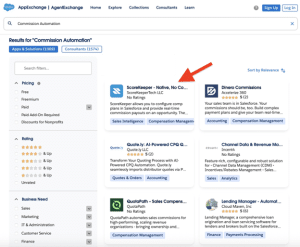 If you prefer not to hire developers or consultants, another option is to use ready-made Salesforce apps that simplify commission tracking. To understand what’s available, we reviewed commission automation apps on the Salesforce AppExchange.
Commission automation on AppExchange
One example of a Salesforce-native commission automation solution we found is ScoreKeeper, a no-code app that allows companies to:
- Set up commission rules visually, without writing formulas or Apex.
- Define rates by product, role, or target in just a few clicks.
- Automatically calculate and display payouts in Salesforce.
- Generate reports and dashboards for transparency.
- Make updates to compensation rules at any time, no code needed for setup or changes.
This approach is ideal for teams that need a quick, easy-to-manage solution without building or maintaining complex logic themselves.
Planning and implementing commission logic using tools
Using Salesforce-native tools from the AppExchange, like ScoreKeeper, can significantly simplify the process of implementing your commission logic. Because many features are pre‑built, you can focus more on defining rules and monitoring results rather than building them from scratch. Down below, you can see the step-by-step guide on how to implement commission logic using a third-party tool from AppExchange, the native Salesforce marketplace.
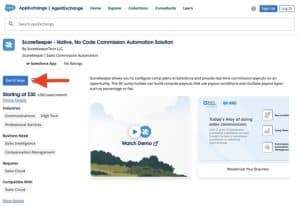 Step 1. Install the app
Begin by installing the app from the Salesforce AppExchange.
Get the app from AppExchange
- Search for the app and install it into your Salesforce org (preferably a sandbox for testing first).
- Assign permissions to users who will manage commissions and dashboards.
- Note: Apps that are native to Salesforce use the existing data model and processes. You don’t need to create a separate custom object or link opportunities manually to a payout object.
ScoreKeeper also provides a 14-day free trial option, allowing you to test its features before committing.
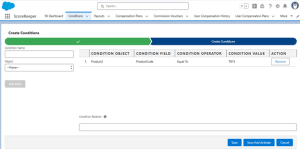
Create a condition
Step 2. Set up commission rules and conditions
After installing the app, you configure your Salesforce commission structure inside it. Create Conditions to determine when a commission or bonus applies. For each condition, you select:
- The Salesforce object to base the condition on (for example, opportunity, product, or account).
- The field to check (for example, product code or region).
- The value that triggers the condition (for example, “Enterprise” or “EMEA”).
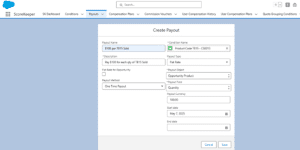
Create payout
After setting the conditions, define the payouts that occur when a condition is met. For each payout, you specify:
- The condition name, payout object, and field are required.
- The payout method and payout type.
- The start date and end date are optional.
If the app is native to Salesforce, much of the calculation infrastructure is already in place. You don’t need to create custom objects, write formulas manually, or write code; you only enter your company-specific conditions and payout rules.
Step 3. Configure the commission plan
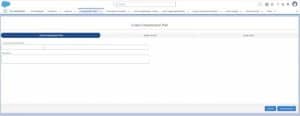 Once your conditions and payouts are ready, you can configure the commission plan directly in ScoreKeeper. To do this, navigate to the Commission Plan tab and create a new plan.
Within the plan, you can:
- Assign the payout you previously set up.
- Assign users who will be covered by this plan.
This approach allows you to manage the plan centrally in the app. All calculations, assignments, and tracking happen automatically based on the conditions and payouts you defined, without needing to manually link Opportunities or other records.
Step 4. Additional payout options
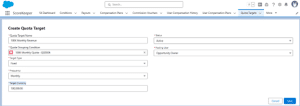 ScoreKeeper allows you to configure additional payout types such as commission vouchers, bonus payouts, or quote-based targets. These features are flexible and can be set up depending on the logic your company needs.
You can adapt them to different roles, products, or business rules, making your compensation plan more comprehensive.
Create quota target
Step 5. Test and validate
Even with a pre‑built system, testing is essential:
- Create sample data for some users and scenarios.
- Verify that the calculated commissions match your expected outcomes.
- If something is off, adjust the rules.
- Testing early prevents errors and distrust when payouts go live.
Step 6. Monitor and maintain
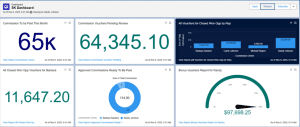 Once the app is live:
- Use built‑in dashboards and reports to monitor performance, payouts, and trends over time.
ScoreKeeper’s Dashboard
- Update your rules when your compensation plan or business conditions change (e.g., new product lines, new regions, new roles).
- Because ScoreKeeper is designed for this, maintenance is faster and less technically demanding compared to building a custom solution.
Final thoughts on salesforce sales compensation
Creating a Salesforce compensation structure takes careful planning and setup. Start by defining goals, collecting accurate data, and designing a clear pay structure for each role.
You can implement the logic using formula fields, Flows, or Apex, or simplify the process with tools like ScoreKeeper, which allow you to configure and adjust conditions, payout rules, and additional types like bonuses or commission vouchers, without any coding, either during setup or when compensation plans change. Testing ensures all calculations are accurate.
Communicate the plan clearly and monitor results to maintain transparency and keep the process fair. Get your 14-day free trial today to see how it handles commission calculations and payouts in practice.