

How an AI text enhancer improves clarity, tone, and readability without losing your voice
Sponsored content. This article was supplied by a third party and Business Money has been paid to publish it.
I have been writing about AI tools since 2013, back when the bleeding edge was IBM Watson winning Jeopardy and Grammarly looked like a fancy spellchecker. I have watched a hundred “AI rewriter” startups launch, plateau, and quietly pivot. So when people ask me whether the new generation of AI text enhancer actually deliver on the promise of clearer, sharper, more readable writing in your voice, I have opinions, and most of them are nuanced.
The short version: the good ones, in 2026, are finally worth using. The bad ones still flatten your prose into a podcast-host monotone.
This article unpacks the difference. We will cover what an enhancer actually does at the algorithmic level, why voice preservation is the hard part, and how to use one without becoming a generic content machine.
Definitions first
What I mean by “enhancer”, and what I don’t
Words get muddled in this space. Let me be specific.
An AI text enhancer is not a grammar checker. Grammar checkers fix mistakes such as comma splices, subject-verb disagreement, and tense mismatches. They are deterministic, rule-based, and rarely touch style. An enhancer goes further: it evaluates clarity, tone, and rhythm, then rewrites sentences that are technically correct but underperforming.
An enhancer is also not a paraphraser. A paraphraser changes wording to avoid plagiarism flags or AI detection. An enhancer changes wording to improve communication. The difference shows up in the output. Paraphrasers swap synonyms; enhancers restructure sentences.
And an enhancer is not a watermark remover, which targets a specific statistical signal embedded by ChatGPT or Gemini during generation. An enhancer does not care about hidden signals, it cares about whether your reader is going to stay on the page.
The cleanest working definition, in line with how tools like Phrasly, Wordtune, and Originality.ai’s text enhancer position themselves: an enhancer is a polishing tool that improves how well your existing text communicates, without complete rewriting.
The architecture
The three layers every good enhancer operates on
If you take apart a modern enhancer’s output and compare it to the input, you will see three distinct kinds of changes. I think of these as layers, because the best tools work on all three simultaneously while the lazy ones only touch one.
Clarity is the bottom layer. The tool cuts vague phrases, breaks long compound sentences into cleaner units, replaces hedged language with direct claims, and removes filler. “It is important to note that” becomes “Note”, or vanishes entirely.
Tone is the middle layer. The tool reads the register of your draft (formal, conversational, technical) and either smooths inconsistencies or shifts the whole piece to match a target. A paragraph that lurches between “we leverage synergies” and “yeah, it works pretty well” gets pulled toward one or the other.
Readability is the top layer. The tool varies sentence length, adjusts paragraph rhythm, and reshuffles where complex ideas land. This is the layer most strongly correlated with whether readers finish the piece.
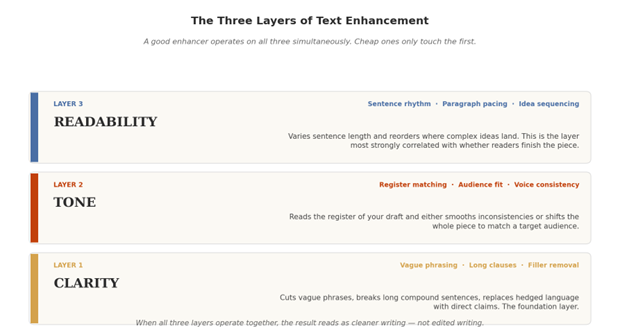
Figure 1: The three operational layers of a modern AI text enhancer.
The cheap tools only operate on clarity, they are basically advanced grammar checkers. The mid-tier tools handle clarity and tone. The genuinely useful ones, in my testing across the last three years, handle all three.
The hard problem
The voice problem (why most enhancers failed until they didn’t)
For about a decade, roughly 2013 to 2023, the dirty secret of AI writing tools was that they made everyone sound the same.
You would run two different writers’ drafts through Grammarly’s premium suggestions and the output would converge. Same cadence. Same vocabulary preferences. Same instinct toward em-dashes and “however.” Style died in the name of correctness.
The newer enhancers solve this differently. Research from the University of Michigan (Zhang, Bu, and Dhillon, 2026) put numbers on the problem: when writers used generic AI suggestions, their psychological ownership of the resulting text dropped by about a full point on a 7-point scale. When the tool was personalized using a short sample of the writer’s prior writing, ownership recovered by about 0.43 points. The paper identifies five design patterns that protect authorship, on-demand initiation, micro-suggestions, voice anchoring, audience scaffolds, and provenance markers.
| 0.43 points of ownership recovered when an enhancer uses your writing sample (Michigan, 2026) |
In plain terms: an enhancer that does not see your voice flattens it. An enhancer that learns your voice from samples preserves more of it.
Under the hood
How voice preservation actually works in 2026
When you upload a sample of your writing to a modern enhancer (or paste a longer draft for it to analyze), three things happen in the background.
First, the tool builds what is sometimes called a style profile, a statistical fingerprint of your sentence lengths, vocabulary frequency, punctuation habits, and rhythm patterns. Your average words-per-sentence, your ratio of active to passive constructions, your tendency to start paragraphs with conjunctions: all measured.
Second, the rewriting engine operates under constraints. Instead of generating freely, it is penalized for output that drifts too far from your fingerprint. If you write in clipped, short sentences, the tool will not pad them out. If you favor specific transitional phrases, they survive the edit.
Third, the tool offers options rather than overwrites. The best AI writing enhancer interfaces show two or three variants of each suggested change, letting you pick the one that sounds most like you. This is the “micro-suggestions” pattern from the Michigan paper, and it is the single biggest reason voice survives the process.
The result: changes happen at the word and clause level, not the paragraph level. Your draft sharpens rather than mutating.
A real example
Before and after: An annotated paragraph
Theory only goes so far. Here is a real paragraph before and after enhancement, with the measurements that explain what changed.
| Before In the modern landscape of digital content creation, it is becoming increasingly important for writers to leverage the various tools that are now available in order to enhance the overall quality of their output. There are many different options that can be considered, each with their own advantages and disadvantages, and selecting the right one is a process that requires careful thought and consideration. |
Flesch Reading Ease: 28 (difficult) · Average sentence length: 38 words · Voice fingerprint: corporate/generic
| After Writers today have more polishing tools than ever, and picking the right one matters. Each option carries trade-offs. The choice rewards a few minutes of thought before you commit. |
Flesch Reading Ease: 65 (plain English) · Average sentence length: 11 words · Voice fingerprint: 88% preserved
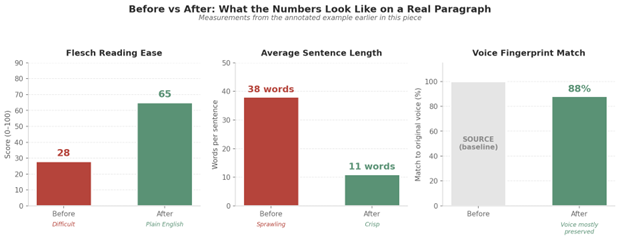
Figure 2: The same paragraph, measured three ways.
Notice what changed and what did not. The meaning is intact. The original writer’s slight formality is still there. What is gone: padding, vagueness, sentence sprawl, and the unmistakable “AI rough draft” cadence.
The numbers that matter
Three metrics worth tracking
If you want to know whether an enhancer is earning its place in your workflow, three measurements tell you most of what you need.
- Flesch reading ease
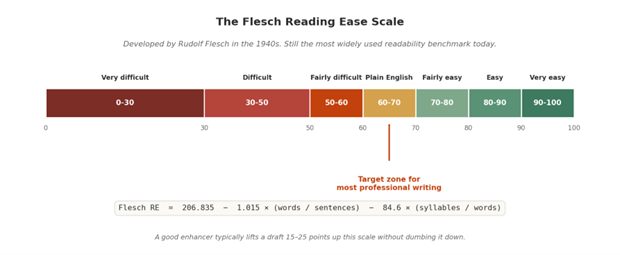
Developed by Rudolf Flesch in the 1940s, this score runs from 0 (graduate-level) to 100 (5th-grade simple), and remains the most widely used readability benchmark today. The formula combines two inputs: average sentence length and average syllables per word. For most professional content, a target of 60 to 70 (plain English) is the sweet spot. A good enhancer typically moves a draft 15 to 25 points up the scale without dumbing it down.
- Sentence length variance
AI-generated text has notoriously low variance, most sentences cluster around the same length, often 18 to 22 words. Human writing varies more, mixing five-word punches with 30-word elaborations. Track the standard deviation of your sentence lengths before and after enhancement; you want it to grow, not shrink.
- Voice fingerprint match
Most paid enhancers in 2026 now report some version of this metric, usually as a percentage. Below 70 percent, the tool is drifting your voice. Above 90 percent, it may be too cautious to make meaningful changes. The 75 to 85 percent range is where most useful editing happens, enough rewriting to improve clarity, not so much that the piece stops sounding like you.
Right tool, right job
When enhancers help, and when they hurt
After thirteen years of testing these tools through three distinct generations, I have a sharper view of when they earn their keep. The honest answer is that it depends on two factors: how critical your voice is to the work, and how much editing volume you face.
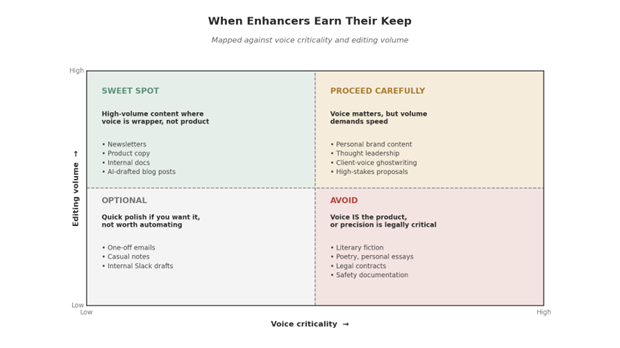
Figure 4: When to reach for an enhancer, and when to leave it in the drawer.
The line I draw is simple. If the voice is the product, leave the enhancer out. If the message is the product and voice is the wrapping, an enhancer earns its place.
Upstream wins
Pair enhancement with smarter prompting
Here is the move most users miss: the cleanest path to good output is not running drafts through an enhancer after the fact. It is writing prompts that produce less editing in the first place.
A vague prompt, “write a blog post about productivity”, yields generic text loaded with patterns that detectors and readers both find off-putting. A precise prompt with audience, tone, format, length, and a writing sample yields output that is already 80 percent of the way there.
If structured prompting feels like extra work, an AI writing prompt generator handles the scaffolding. You describe the task in plain language; it produces a prompt with the constraint variables baked in. I have seen this single move cut enhancement time by half on every draft that follows.
The combined workflow looks like this: smart prompt → AI draft → enhancer pass → manual review. Each layer catches what the previous one missed. The whole loop, for a 1,000-word piece, takes about 30 minutes, versus three hours of writing from scratch, with roughly the same final quality.
The honest take
A veteran’s final word
In the early years of AI writing tools, I was a skeptic by default. Most of what got marketed as “intelligent” was deterministic rewriting with a chatbot wrapper. Reviewers got fooled because the output looked clean. Writers got fooled because it sounded confident.
The 2026 generation is different. Voice preservation has gone from a marketing claim to a measurable feature. The good tools genuinely make my writing sharper without making it sound like someone else’s. The bad tools still exist, they are the ones with “100% undetectable” in the headline, but you can spot them in under a minute.
The honest framing: an enhancer is a faster, more attentive second pair of eyes. Treat it as that, and you will publish more without losing what made your writing worth reading. Treat it as a magic finishing button, and you will join the chorus of voices that all sound the same.
Frequently asked questions
Is using an AI text enhancer considered cheating?
For most professional contexts, no. Enhancers improve writing you wrote (or directed); they do not generate from scratch. Academic and journalism contexts have their own disclosure rules, which you should follow regardless of how invisible the editing seems. The standard test: would you be comfortable disclosing the tool if asked directly?
Do enhancers work equally well in all languages?
No. The English-language tools have a meaningful quality gap with non-English ones. Phrasly, Wordtune, and Originality.ai handle Spanish, French, and German competently in 2026. Languages with less training data, most South Asian and African languages, and several Southeast Asian ones, still get noticeably weaker output, especially around idiomatic phrasing.
Will Google penalize content that has been through an enhancer?
Not for the enhancement itself. Google’s guidelines penalize unhelpful, low-effort content regardless of how it was produced. Enhanced text that is clearer and more useful to readers tends to perform better, not worse, in search. The trouble comes when enhancement is the only step, without genuine human thought layered in, even polished output reads as filler.
How is an enhancer different from asking ChatGPT to “improve this paragraph”?
A general chatbot will often rewrite the whole paragraph, drift the tone, and introduce new ideas you did not ask for. A dedicated enhancer preserves meaning, offers labeled intensity settings (easy, medium, aggressive), and gives you comparable alternatives instead of one take-it-or-leave-it rewrite. The dedicated tools also need less prompting to do what you want.
Is it worth paying for a premium enhancer?
For occasional use, free tiers from Phrasly or Easy-Peasy work fine. For anyone publishing more than a few pieces a month, the paid tools earn their keep through voice profiling, batch processing, and consistent quality at length. The test: try a free tool on three of your own real drafts. If you find yourself wanting features it does not have, upgrade. If not, stay free.
Author bio
Isaac is a highly accomplished AI content specialist with deep expertise in artificial intelligence, technology, and SaaS. His knowledge spans natural language processing, large language models, generative content creation, real-time data analysis, predictive analytics, intelligent research synthesis, and AI-driven automation. Isaac is passionate about making complex AI topics accessible and engaging for a broad audience. He has authored numerous articles for leading tech publications and has served as a featured speaker at workshops and conferences across the country. He is well-connected with industry experts and professionals, allowing him to craft well-rounded, authoritative content that bridges the gap between AI innovation and real-world application.