

How diffusion models generate images explained for non-technical creators
Sponsored content. This article was supplied by a third party and Business Money has been paid to publish it.
 You type a few words. Seconds later, a fully realized image appears on your screen.
No camera. No Photoshop skills. No design degree needed.
It feels like magic, but there’s a surprisingly elegant process behind it. Understanding how diffusion models work won’t make you an AI engineer. It will, however, make you a sharper, more intentional creator.
This is how diffusion models generate images, explained without the jargon.
The big idea: Teaching AI to work backwards
Every diffusion model starts with a simple observation: noise is easy to add, and with enough training, it can be reversed.
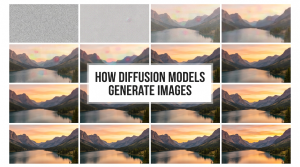
Imagine taking a crystal-clear photograph and slowly burying it under static. You add a tiny bit of fuzz in step one, a little more in step two, and keep going for hundreds of steps until all that’s left is a gray, grainy blur. That’s the forward process, and it’s what the AI is trained on.
The model studies thousands of these noise-addition sequences. It learns to answer one question at each step: “Given this noisy image, what did it look like one step earlier?” After enough training, the model becomes remarkably good at predicting how to peel back the noise layer by layer.
That skill (predicting the previous step) is everything. It’s what lets the AI run the process in reverse.
From static to image: The reverse process
Here’s where the real magic kicks in.
At generation time, the model doesn’t start with your photo and add noise. It starts with pure noise, a completely random field of pixels, and works backwards. It applies its learned predictions, step by step, to nudge that chaos toward something coherent. After dozens or hundreds of steps, a clear image emerges.
The name “diffusion” comes from the fact that the model starts with a high-entropy image (essentially a random image with no structure) and then gradually diffuses the entropy away, making the image increasingly structured and realistic.
Think of it like a sculptor who starts with a block of marble. Each pass of the chisel removes a little chaos. The final form was always hidden inside; the tool just reveals it.
This also explains why diffusion models tend to nail composition before they nail details. Research shows that generation involves first committing to an outline, then to finer and finer details. The broad strokes of a scene lock in early. Texture and nuance fill in as the steps progress.
How your text prompt steers the process
Pure noise could become anything: a forest, a face, a product shot. Your prompt is what guides the outcome.
Conditional image generation is where the model is provided additional information via text. By passing in additional information, the model is expected to generate specific sets of images.
In practical terms, your words get translated into a numerical representation, a kind of coordinate in a vast “concept space.” That coordinate acts as a compass throughout the denoising process. At every step, the model keeps asking: “Is this image moving toward what the prompt describes?”
The more specific your prompt, the sharper that compass bearing. “A golden retriever on a beach at sunset, photorealistic, warm tones” gives the model far more to work with than “a dog.” Both will produce a dog. Only one will produce your dog.
This is why prompt craft matters so much. You’re not just describing an image. You’re calibrating the direction of a hundred-step process.
Why output quality has improved so dramatically
Early AI images were notoriously strange: melted faces, extra fingers, garbled text.
Modern diffusion models are different. They’re trained on vastly larger datasets, run on more powerful hardware, and use architectural improvements that push quality higher with every generation. A single neural network is trained on image pairs from different diffusion steps. During generation, the noisy image is passed through the same trained network multiple times, gradually refining until a high-quality image is produced.
The result is a compounding effect: more training data teaches the model a richer understanding of how real images look. Better architectures let it apply that knowledge more precisely at each denoising step.
Tools like Magic Hour AI put these improvements in the hands of everyday creators. Magic Hour’s AI image generator creates original images from text prompts using state-of-the-art diffusion models, with 400+ styles available including photorealistic, anime, and concept art, all in the browser, in seconds.
You don’t need to understand the math to benefit from these advances. But knowing they exist helps you trust the tool and push it harder.
What this means for your creative workflow
Understanding diffusion models changes how you work with them, in three concrete ways.
Prompts are instructions, not descriptions. You’re not captioning a photo you already have. You’re guiding a multi-step process toward a target that doesn’t exist yet. Specificity, style references, and mood cues all help the model converge on what you actually want.
Iteration is the workflow. Because every run starts from random noise, the same prompt produces different results each time. That’s a feature, not a bug. Think of each generation as a draft. Run several versions, pick the one closest to your vision, and refine from there.
Style consistency requires effort. Diffusion models don’t have memory between sessions. If you want a consistent character, color palette, or brand aesthetic, you need to encode those constraints in every prompt. Many platforms offer style presets or reference image inputs for exactly this reason.
The underlying engine is sophisticated. The creative role, though, stays very human.
Diffusion models work by learning to reverse a process of controlled destruction. They study how noise is added to real images, then learn to do the opposite. Starting from static, they step backward, guided by your prompt, until something coherent and beautiful takes shape. The more deliberately you engage with that process, the better your results will be.