

Epson printer ink cartridge savings: Optimize workflows
Sponsored content. This article was supplied by a third party and Business Money has been paid to publish it.
Optimizing business efficiency with document workflow solutions
The cost of inefficiency: From desktop printers to managed workflows

In today’s competitive business environment, efficiency drives success. We often focus on major strategic shifts. Yet, the everyday management of documents significantly impacts productivity and costs.
Consider the resources spent on printing, organizing, and retrieving information. These tasks, from managing printer ink cartridges to complex filing systems, can create unexpected bottlenecks. They add up to considerable time and expense.
This guide will explore how optimizing document processes can transform your operations. We will move beyond just the supplies needed for desktop printers. Instead, we’ll delve into comprehensive document-workflow solutions. Our goal is to help you unlock greater efficiency.
Join us as we examine strategies to reduce waste and streamline operations. We’ll cover transitioning from traditional methods to integrated, digital workflows. This approach empowers your team to achieve more, working smarter, not harder.
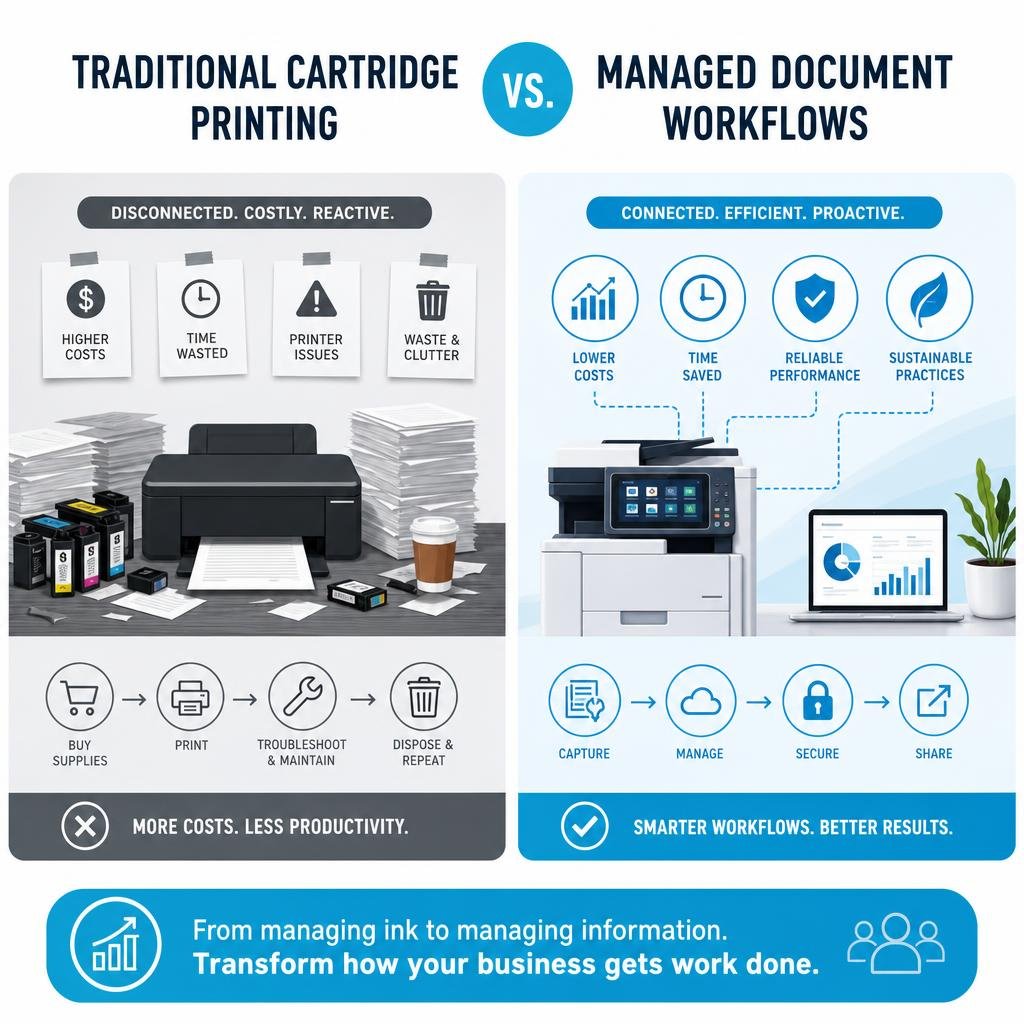
When we consider the operational costs of a business, the expense of printer supplies, such as Epson printer ink cartridges, might seem minor at first glance. However, looking deeper reveals a significant drain on resources, both tangible and intangible. The cumulative effect of purchasing, managing, and replacing these consumables, alongside the hardware they support, contributes to a larger picture of inefficiency.
For many businesses, the office environment often features a collection of disparate desktop printers. Each printer, whether an Epson WorkForce, Expression, or Artisan model, requires specific ink cartridges. This leads to a complex inventory challenge: stocking various types like the Epson 202XL, 252XL, or 410XL, along with standard and high-yield options. The constant need to monitor ink levels, place orders, and manage supplier relationships consumes valuable employee time. Furthermore, the physical space taken up by spare cartridges and the waste generated by empty ones add to the hidden costs.
Beyond the direct expense of an Epson printer ink cartridge, there are maintenance overheads. Printers, particularly inkjet models, are prone to issues like print head clogs if not used regularly. This necessitates frequent print head cleaning cycles, which consume ink and further reduce efficiency. The time spent troubleshooting printer errors, waiting for IT support, or simply replacing cartridges interrupts workflow and diverts employees from core tasks.
Consider a small business that frequently prints documents. They might choose an Epson WorkForce printer for its speed (up to 38 pages per minute with PrecisionCore technology) and all-in-one capabilities. However, if they’re using standard capacity cartridges, they could be replacing them frequently, sometimes after only 300 pages. This constant interruption, coupled with the higher cost-per-page of standard cartridges, quickly adds up.

The “inkjet printer paradox” is a well-known phenomenon: printers are often sold at a discount to secure an ongoing customer base for proprietary ink cartridge sales. This model can lead to a higher total cost of ownership than initially perceived. While alternative solutions like compatible or remanufactured cartridges promise significant savings (up to 70-80% less than genuine Epson counterparts), they can introduce their own set of challenges, such as potential warranty issues or inconsistent print quality.
Instead of focusing solely on the cheapest Epson printer ink cartridge or the most affordable printer, businesses are increasingly recognizing the need for a more strategic approach. Managed print services and comprehensive document workflow solutions offer a path to consolidate equipment, optimize usage, reduce waste, and streamline the entire document lifecycle. This shift moves beyond reactive purchasing to proactive management, transforming printing from a cost center into a more efficient, integrated part of business operations.
Moving beyond traditional inkjet cartridges
The evolution of printer ink technology offers various options, each with its own implications for cost and efficiency. Understanding these differences is crucial for any business, even as we advocate for broader document workflow solutions.
Traditional Epson printer ink cartridges come in several forms:
- Standard capacity cartridges: These are the basic offerings, providing a moderate page yield. While cheaper upfront, their cost-per-page is typically higher due to more frequent replacements. For example, a standard Epson 252 cartridge might yield around 300 pages.
- High-yield (XL) cartridges: Designed for users with higher printing volumes, XL cartridges contain more ink and offer a significantly lower cost-per-page. An Epson 252XL, for instance, can print over 1,100 pages – more than triple the standard version. Similarly, the 202XL Claria Premium ink cartridges can print up to 800 photo black pages, 550 black pages, and 650 color pages. Opting for XL versions like the 202XL, 252XL, or 410XL is often a simple way to save money on Epson ink cartridges for those still reliant on traditional systems.
- Ink type variations: Epson utilizes different ink formulations for specific purposes. Claria inks (like the 202XL, 232, 212, 302 series) are dye-based, known for vibrant photo quality and longevity (photos printed with Claria Premium ink can last up to 300 years in a photo album). DURABrite Ultra inks (e.g., 822, 812, 220, 288, 252, 702 series) are pigment-based, offering sharp, smudge-resistant text, ideal for business documents. Some cartridges, like the Claria Premium, even combine pigment black for text and dye-based colors for photos, offering a versatile solution.
A significant innovation from Epson has been the introduction of EcoTank printers. These models represent a departure from traditional cartridges, instead featuring large, refillable ink tanks. Users purchase high-capacity ink bottles (like the Epson 102, 103, or 114 series) to replenish the tanks. The benefits are substantial:
- Massive cost savings: EcoTank printers can save up to 90% on ink costs compared to traditional cartridge-based printers.
- Ultra-high page yields: One set of Epson 102 ink bottles can print up to 7,500 pages in black and 6,000 in color. The Epson 103 series offers up to 4,500 pages in black and 7,500 in color. For photo enthusiasts, the Epson 114 Claria ET Premium ink bottles can print up to 2,300 high-quality photos with one set.
- Reduced waste & convenience: Fewer replacements mean less plastic waste and less frequent intervention. The bottles are designed for mess-free, key-locked refills, preventing accidental color mixing.
While EcoTank systems offer a compelling alternative to traditional cartridges, they still represent a form of localized ink management. For businesses with higher printing demands or those seeking to offload print management entirely, even EcoTank systems might not be the ultimate solution. The goal is to move beyond the reactive cycle of buying ink and managing individual machines towards a more integrated, proactive document strategy.
Implementing office document workflow solutions for modern teams
In an era defined by distributed workforces and rapid information exchange, merely managing printer ink is a relic of the past. Modern teams require agile, secure, and collaborative document management. This is where office document workflow solutions become indispensable, transforming how information is created, processed, and stored. These solutions are designed to eliminate manual bottlenecks, enhance collaboration, and ensure data integrity across the organization.
The shift from physical documents and traditional printing to digital workflows is not just about going “paperless”; it’s about enabling seamless interaction with information. Imagine a sales team that can instantly access, update, and share client contracts from any device, or a human resources department that can automate the onboarding process for new hires, reducing paperwork and accelerating integration. These are the tangible benefits that digital document workflows bring to the table.
By centralizing document management in a digital environment, teams can overcome geographical barriers, fostering a more connected and productive work culture. This approach also inherently improves document security, as access can be meticulously controlled and monitored, a stark contrast to the vulnerabilities of physical filing systems.

Key components of office document workflow solutions
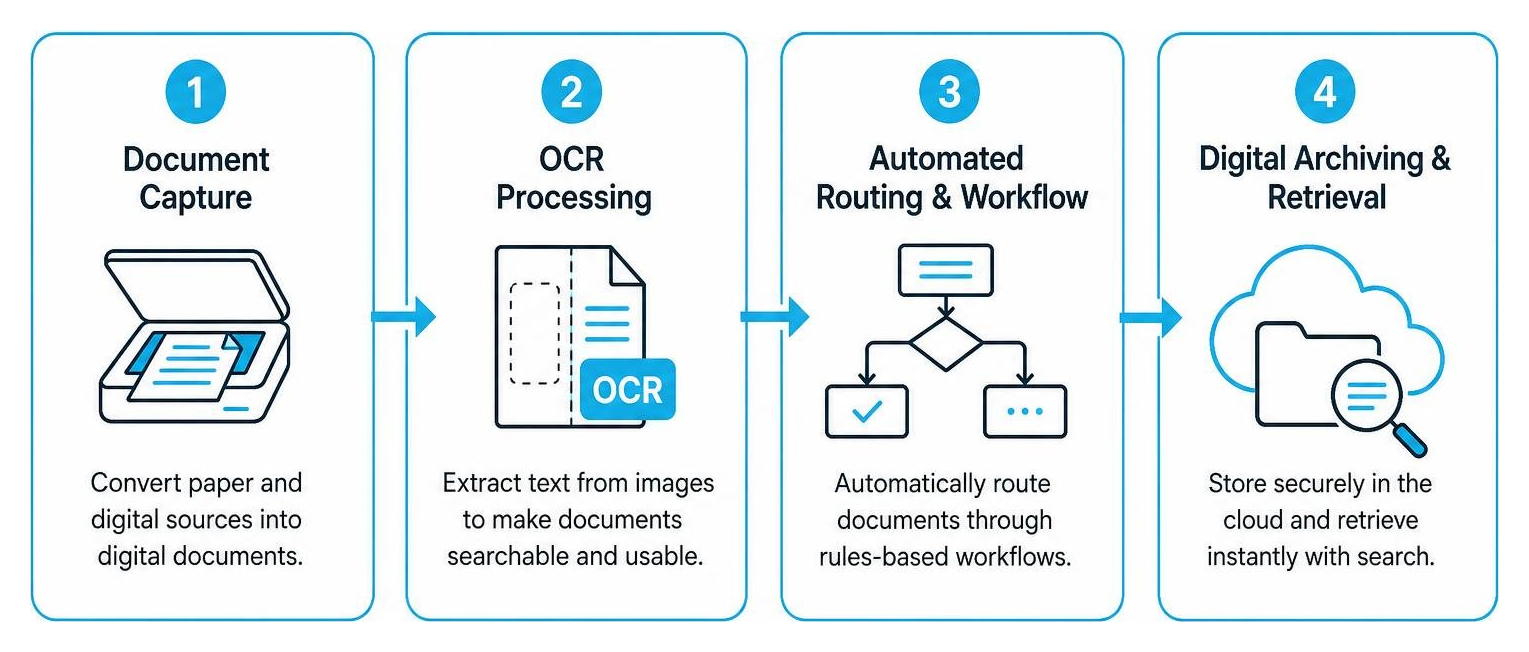
Effective document workflow solutions are built upon several interconnected components that work in harmony to manage the entire document lifecycle. Understanding these elements is key to appreciating their transformative power:
- Document capture: This is the entry point for information, converting physical documents into digital formats. High-speed scanners with advanced features can process large volumes of paper, but capture also extends to digital-native documents like emails, forms, and digital faxes.
- Optical character recognition (OCR): Once documents are captured, OCR technology converts images of text into machine-readable text. This is a critical step, making documents searchable, editable, and extractable for data. Without OCR, scanned documents are merely static images, limiting their utility in a digital workflow.
- Automated routing and workflow: This is the “workflow” in document workflow. Rules-based automation directs documents through predefined processes, such as approvals, reviews, or data entry. For example, an invoice might be automatically routed to the finance department for approval, then to accounting for payment, and finally archived. This eliminates manual hand-offs, reduces delays, and ensures compliance with internal procedures.
- Digital archiving and retrieval: Secure, centralized digital repositories replace physical filing cabinets. Documents are indexed and stored in a way that allows for quick and accurate retrieval. Advanced search capabilities, often powered by OCR, mean that finding a specific document can take seconds, not minutes or hours. This also ensures long-term preservation and compliance with record-keeping regulations.
These components collectively form the backbone of modern document-workflow solutions that are essential for businesses seeking to optimize their operations. For organizations looking to implement or enhance these capabilities, exploring robust solutions is a critical step towards greater efficiency and control.
How to choose the right office document workflow solutions
Selecting the appropriate document workflow solution requires careful consideration of several factors to ensure it aligns with your business’s unique needs and future growth.
- Scalability: Your business will evolve, and your document management system should too. Choose a solution that can easily scale up or down based on your volume of documents, number of users, and storage requirements. This prevents the need for costly migrations or replacements as your business grows.
- User integration and adoption: Even the most advanced system is ineffective if employees don’t use it. Prioritize solutions with intuitive interfaces and minimal learning curves. Look for features that enhance user experience, such as drag-and-drop functionality, customizable dashboards, and seamless integration with familiar applications. Adequate training and support are also crucial for successful adoption.
- Software compatibility: Your new document workflow solution should integrate smoothly with your existing business applications, such as CRM, ERP, accounting software, and email platforms. This avoids creating new data silos and ensures a unified information ecosystem.
- Security compliance: Data security is paramount. Ensure the solution offers robust security features like encryption, access controls, audit trails, and data backup. Critically, verify its compliance with relevant industry regulations (e.g., HIPAA for healthcare, GDPR for data privacy, SOX for financial reporting). This protects sensitive information and mitigates legal risks.
- Vendor support and service level agreements (SLAs): Evaluate the vendor’s reputation for customer support. What kind of technical assistance do they offer? What are their response times? A strong SLA provides assurance that you’ll receive timely support for any issues, minimizing downtime and disruption.
By thoroughly assessing these aspects, businesses can make an informed decision that leads to a successful implementation and long-term benefits.
Digital transformation: Transitioning from paper to cloud workflows
The journey from managing physical documents and local printer supplies to a fully digital, cloud-based workflow is a cornerstone of modern digital transformation. This transition is not merely about moving files to a server; it’s a fundamental shift in how information is managed, accessed, and secured, unlocking unprecedented levels of flexibility and efficiency.
Cloud migration in the context of document workflows involves storing and managing all business documents, from contracts and invoices to presentations and reports, on secure cloud platforms. This eliminates the need for physical storage, reduces reliance on on-premise infrastructure, and dramatically simplifies access. The ideal of a “paperless office” becomes a tangible reality, leading to a cleaner, more organized workspace and a significant reduction in printing-related costs, including the constant need for supplies like Epson printer ink cartridges.
One of the most compelling advantages of cloud-based document management is enhanced data security. Reputable cloud providers invest heavily in state-of-the-art security measures, often exceeding what most small to medium-sized businesses can afford or manage internally. This includes robust firewalls, intrusion detection systems, and continuous monitoring. Furthermore, cloud platforms facilitate stringent access controls, ensuring that only authorized personnel can view, edit, or share sensitive documents.
Remote access is another game-changer. With documents stored in the cloud, employees can securely access critical information from anywhere, at any time, using any device. This supports flexible work arrangements, enhances collaboration among geographically dispersed teams, and ensures business continuity in the face of unforeseen disruptions. Whether working from home, on the road, or in a different office, the entire team operates from a single, up-to-date source of truth.
Transitioning to cloud-based document management involves a structured approach. Here are the key steps:
Enhancing security and compliance
In a world increasingly concerned with data breaches and regulatory mandates, enhancing security and ensuring compliance are non-negotiable aspects of any digital workflow solution. Cloud-based document management systems offer powerful tools to address these critical needs.
- Data encryption: This is a foundational security measure. Documents stored in the cloud should be encrypted both “at rest” (when they are stored on servers) and “in transit” (when they are being accessed or moved across networks). This renders data unreadable to unauthorized parties, even if they manage to gain access to the storage infrastructure.
- Access controls and user permissions: Granular access controls allow administrators to define precisely who can view, edit, delete, or share specific documents or folders. Permissions can be set at various levels, from individual users to groups and departments, ensuring that sensitive information is only accessible to those with a legitimate need. Role-based access helps maintain order and prevent accidental or malicious data exposure.
- Audit trails: A comprehensive audit trail records every action taken within the document management system: who accessed a document, when, what changes were made, and from where. This provides an invaluable record for security monitoring, investigations, and demonstrating compliance to auditors. It creates accountability and transparency across all document interactions.
- Regulatory compliance: Many industries are subject to strict regulations regarding data handling and record keeping (e.g., HIPAA for healthcare, GDPR for European data protection, SOX for financial data). Cloud-based document solutions can be configured to help businesses meet these requirements by providing features like retention policies, legal holds, and secure data disposal. Choosing a provider that understands and adheres to these standards is crucial.
- Disaster recovery: Cloud platforms inherently offer superior disaster recovery capabilities compared to on-premise solutions. Data is typically replicated across multiple geographically dispersed data centers, ensuring that information remains accessible even if one location experiences an outage. This built-in redundancy protects against data loss from hardware failures, natural disasters, or cyberattacks, ensuring business continuity.
By meticulously implementing these security and compliance features, businesses can safeguard their invaluable information assets, build trust with clients, and navigate the complex regulatory landscape with confidence.
Frequently asked questions about document workflows
As businesses explore the transition to optimized document workflows, several common questions arise. Addressing these concerns helps clarify the benefits and practicalities of such a significant operational shift.
What are the primary benefits of automating document workflows?
Automating document workflows yields a multitude of benefits that directly impact a business’s bottom line and operational efficiency.
- Time savings: By eliminating manual tasks like printing, scanning, filing, and routing, employees save significant time that can be redirected to more strategic activities. Processes that once took days can be completed in hours or minutes.
- Error reduction: Manual data entry and document handling are prone to human error. Automation reduces these mistakes, leading to greater accuracy in data, fewer reprocessing efforts, and improved decision-making.
- Cost efficiency: Beyond saving on printer ink cartridges and paper, automation reduces labor costs associated with manual processes, minimizes storage expenses for physical documents, and lowers the risk of penalties from compliance failures.
- Enhanced employee productivity: With repetitive, tedious tasks handled by the system, employees are freed up to focus on higher-value work, leading to increased job satisfaction and overall productivity.
How do digital document workflows improve data security?
Digital document workflows fundamentally transform data security by moving away from vulnerable physical systems to robust digital environments.
- Encryption: Data is encrypted both at rest and in transit, making it unreadable to unauthorized parties.
- Granular permission levels: Access to documents can be precisely controlled, ensuring only authorized individuals or roles can view, edit, or share specific information. This prevents unauthorized access and data leakage.
- Secure storage: Cloud-based solutions leverage enterprise-grade data centers with advanced physical and cyber security measures, often exceeding what individual businesses can implement.
- Compliance standards: Digital workflows can be configured to meet strict regulatory compliance standards, providing audit trails and retention policies that demonstrate adherence to legal and industry requirements.
Can small businesses benefit from enterprise-level workflow solutions?
Absolutely. While the term “enterprise-level” might suggest solutions exclusively for large corporations, modern document workflow solutions are highly adaptable and scalable, making them accessible and beneficial for small businesses as well.
- Scalability: Solutions are designed to grow with your business, allowing you to start with basic features and expand as your needs evolve.
- Budget-friendly options: Many cloud-based solutions operate on a subscription model, eliminating large upfront investments in hardware and software. This makes sophisticated tools affordable for smaller budgets.
- Cloud accessibility: Cloud platforms level the playing field, providing small businesses with access to the same robust infrastructure and security features previously only available to large enterprises.
- Resource optimization: By automating tasks and improving efficiency, small businesses can maximize their limited resources, allowing their teams to focus on core business growth rather than administrative overhead.
Conclusion
The journey from meticulously managing every Epson printer ink cartridge to embracing comprehensive document workflow solutions marks a pivotal shift for businesses aiming for true efficiency. We’ve explored how the seemingly minor costs and inconveniences of traditional printing methods accumulate into significant operational inefficiencies. Moving beyond these conventional approaches, particularly by leveraging innovations like EcoTank printers or, more strategically, by adopting digital workflow solutions, offers a clear path to substantial savings and enhanced productivity.
By implementing automated document capture, OCR, intelligent routing, and secure digital archiving, organizations can transform their operations. This not only streamlines daily tasks but also fortifies data security and ensures regulatory compliance, critical aspects in today’s digital landscape. The transition to cloud-based workflows further empowers teams with remote access and robust disaster recovery capabilities, fostering a resilient and agile business environment.
Optimizing document workflows is not just about reducing print costs or going paperless; it’s about a fundamental digital transformation that redefines how information flows through your organization. It’s an investment in the future of work, enabling teams to collaborate more effectively, make faster decisions, and focus on innovation rather than administrative burdens. By engaging in strategic planning and committing to continuous improvement in document management, businesses can unlock their full potential and thrive in an increasingly competitive world.