

Companies like HubSpot: Smart CRM guide
Sponsored content. This article was supplied by a third party and Business Money has been paid to publish it.
Practical digital marketing guidance for small businesses
Introduction

Navigating the vast landscape of digital marketing tools can be a significant challenge for any small business. Choosing the right platforms for customer relationship management (CRM) and marketing automation is crucial for growth in today’s competitive market. The right software can streamline your operations, enhance customer experiences, and free up valuable time.
Many businesses start with well-known all-in-one solutions. However, as needs evolve, some find themselves seeking alternatives that better fit their specific requirements or budget. We understand the importance of making informed decisions when it comes to your tech stack.
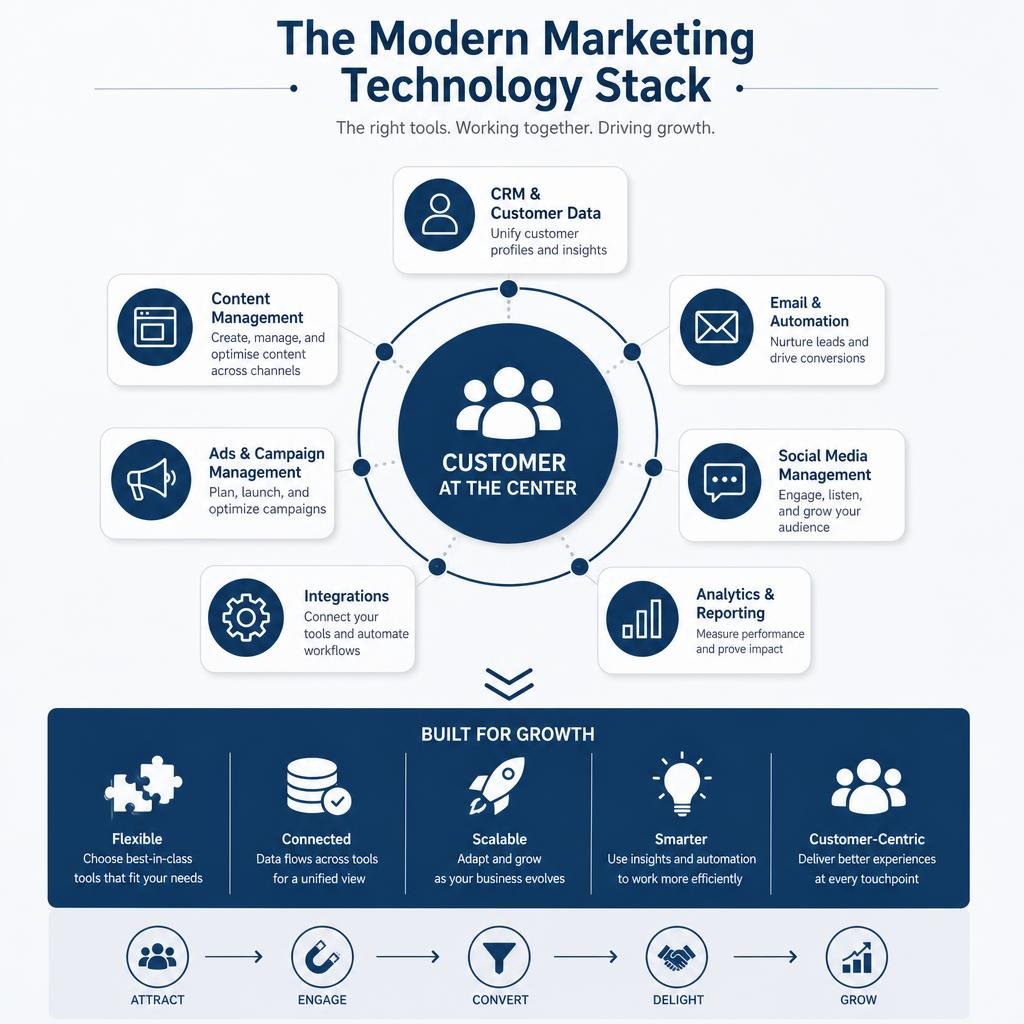
In this extensive guide, we will explore key reasons why businesses look for different solutions. We’ll compare various platforms, examine the benefits of both all-in-one and modular tech stacks, and delve into the rising influence of AI-native CRMs. Our goal is to provide you with the practical digital-marketing guidance you need to select the best tools for your business’s unique journey.
Evaluating the all-in-one vs. modular tech stack dilemma
For years, the promise of an “all-in-one” platform has captivated businesses, offering a single solution for CRM, marketing, sales, and customer service. Companies like HubSpot have championed this approach, providing a comprehensive suite designed to cover every aspect of the customer journey. The appeal is clear: simplified vendor management, integrated data, and a unified user experience. However, as businesses grow and their needs become more specialized, the limitations of this model often surface.
While an all-in-one platform might be a convenient starting point, it can lead to what we call “software bloat.” This occurs when businesses pay for a vast array of features they rarely use, driving up the total cost of ownership (TCO) without delivering commensurate value. Our research indicates that the “all-in-one” CRM promise has, for many, failed to deliver on its full potential, prompting a shift towards more agile strategies.
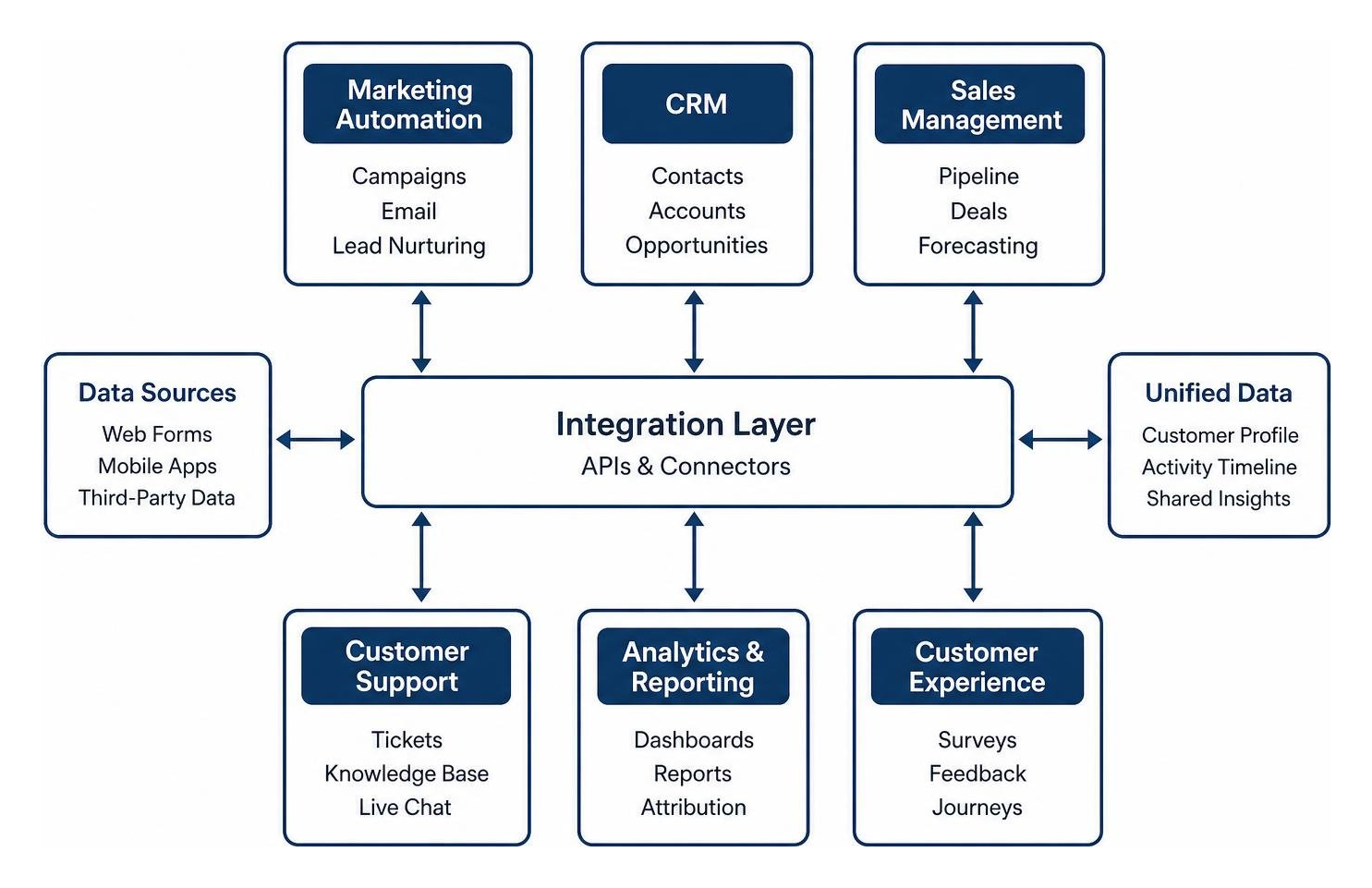
This has led many organizations to consider a modular tech stack. Instead of a single monolithic system, a modular approach involves selecting best-in-breed tools for specific functions—one for advanced marketing automation, another for customer experience, and perhaps a third for sales pipeline management. The success of a modular stack hinges on robust integration APIs that allow these specialized tools to communicate seamlessly, sharing data and automating workflows across the ecosystem. This strategy allows businesses to optimize each function with purpose-built software, avoiding the compromises inherent in a catch-all solution.
The decision between an all-in-one platform and a modular tech stack is not merely about features; it’s about strategic alignment with your business goals and understanding the true total cost of ownership. This includes not just subscription fees, but also the costs associated with integration, customization, training, and ongoing maintenance. A modular approach often provides greater flexibility and scalability, allowing businesses to adapt their tools as their needs evolve without being locked into a rigid, expensive system.
Essential digital marketing guidance for choosing CRM and automation software
When businesses begin searching for alternatives to prominent platforms like HubSpot, it’s often driven by a few critical factors: cost, the need for more specialized functionalities, or limitations within their current setup. HubSpot, while powerful, is frequently cited as one of the more expensive CRM software options, particularly when considering its marketing add-ons. This financial “cliff,” where upgrading from a free or starter plan to professional tiers can represent a massive price jump, can be prohibitive for many small to medium-sized businesses (SMBs).
One primary reason businesses look elsewhere is to find solutions that offer better value for money, especially for SMBs. Platforms like EngageBay, Zoho, Brevo, and Mailchimp often provide robust features at more accessible price points, making them strong contenders for those on a tighter budget.
For businesses where customer experience (CX) and customer service are paramount, HubSpot’s Service Hub, being a relatively newer offering, may not yet match the depth and specialization of dedicated CX platforms. For instance, established solutions like Zendesk are trusted by over 160,000 businesses globally, offering advanced features for managing customer interactions across multiple channels. HubSpot’s limitations, such as a lack of native SMS and popular social channels for direct communication, can increase the total cost of ownership as businesses must then invest in third-party add-ons to fill these gaps. This can also lead to challenges in customizing knowledge bases or duplicating articles, creating manual rework.
When it comes to sales and marketing automation, businesses often seek alternatives that provide more tailored or advanced capabilities. While HubSpot owns almost a third of the marketing automation market, some competitors offer specialized strengths. ActiveCampaign, for example, is lauded as a powerhouse for marketing automation with its sophisticated workflow builder, while Pipedrive is often favored for its visual sales pipeline management. Close CRM, as we will discuss, integrates AI directly into its sales processes, offering a unique edge.
To make an informed decision, we advise businesses to:
- Evaluate specific needs: Clearly define whether your primary goal is to enhance CX, optimize sales, or streamline marketing automation.
- Calculate total cost of ownership (TCO): Look beyond the base price to include add-ons, integrations, customization, and potential training costs.
- Utilize free trials: Test platforms thoroughly (most offer 14-30 day trials) to assess usability, integration capabilities, and team adoption before committing.
For more comprehensive insights into selecting the right tools, including a detailed look at various options beyond HubSpot, we recommend exploring further practical digital-marketing guidance that delves into evaluating different platforms.
The decision to switch from an all-in-one platform to specialized tools or a different all-in-one solution is a strategic one. It requires a clear understanding of your current pain points, future growth aspirations, and a willingness to invest time in evaluating alternatives that align with your unique operational and financial requirements.
The rise of AI-native platforms vs. traditional systems
The digital marketing landscape is undergoing a profound transformation with the advent of AI-native platforms. Unlike traditional CRMs, which often integrate AI as an add-on feature, AI-native systems are built from the ground up with artificial intelligence at their core. This fundamental difference means AI isn’t just a tool; it’s an integral part of how the platform operates, enabling autonomous agents, predictive analytics, and generative capabilities that redefine customer relationship management and marketing automation.
Traditional platforms, including established players like HubSpot and Salesforce, while powerful and increasingly AI-enhanced, typically follow a database-centric model. They store customer data, automate workflows based on predefined rules, and offer reporting. AI capabilities, when present, often augment these functions rather than driving them autonomously. In contrast, AI-native CRMs envision the system itself as an “agent” or “manager” that proactively takes the next best step for the customer, anticipating needs and automating responses.
A key characteristic of these modern platforms is the emphasis on low-code or no-code workflows. This empowers businesses to customize and build complex processes without needing extensive technical expertise, accelerating implementation and reducing reliance on developers. Creatio, for example, highlights its no-code visual designers, enabling businesses to create applications and automate workflows ten times faster.
Leveraging AI-native tools for automated digital marketing guidance
AI-native tools are fundamentally changing how businesses approach digital marketing, offering unprecedented levels of automation and personalization. These platforms are moving beyond simple automation to what is often termed “agentic marketing,” where AI agents take on active roles in executing tasks.
Consider these applications:
- Conversational interfaces: Platforms like Creatio and Close CRM’s “Chloe” AI agent can engage with customers and leads through natural language, answering questions, qualifying prospects, and even booking meetings autonomously.
- Automated qualification and meeting booking: AI agents can handle initial lead outreach, ask qualifying questions, and schedule appointments, freeing up human sales teams to focus on high-value interactions. Close CRM users, for instance, have seen lead response times drop from hours to minutes, and booked appointments increase by 50% with AI assistance.
- Workflow orchestration: AI agents can build, coordinate, and optimize marketing campaigns across various channels. Creatio Marketing, for example, features AI agents for content generation, email creation, campaign management, lead scoring, and lead distribution, executing workflows with minimal human intervention. Similarly, Conversion’s “Conversion Agents” can handle tickets, QA, reporting, and campaign builds, automating repetitive tasks that typically consume significant marketing operations (MOps) team time.
- Predictive and generative AI: These systems leverage predictive AI to identify high-intent leads and generative AI to create personalized content, from email drafts to ad copy, at scale. This allows for hyper-personalized marketing that was previously impossible to achieve manually.
These capabilities mean that businesses can ship campaigns in hours instead of weeks, significantly reduce manual data entry, and improve lead response rates, ultimately accelerating the entire lead-to-revenue cycle.
Overcoming the financial cliff of traditional software licensing
One of the most persistent frustrations with traditional CRM and marketing automation platforms, particularly for growing businesses, is the “pricing cliff.” This refers to the massive jump in cost when upgrading from a basic or starter plan to more advanced professional or enterprise tiers. HubSpot’s pricing model, for example, has been noted for its significant leap from Starter plans (around $20-$50/month) to Professional marketing features (which can be $890/month or more). This makes scalability financially challenging for many SMBs.
Traditional licensing models often involve:
- Seat-based licensing: Charging per user, which can become prohibitively expensive as teams grow.
- Contact limits: Tiers based on the number of contacts in your database, leading to unexpected cost increases as your list expands.
- Feature caps: Essential features being locked behind higher, more expensive tiers.
AI-native platforms and some modern alternatives are addressing these pain points with more flexible and transparent pricing structures. For instance:
- Unlimited user/agent models: Creatio champions an “unlimited enterprise” model, offering unlimited users, custom agents, workflows, and applications. This removes the scaling friction associated with per-seat pricing.
- Composable pricing: Creatio also offers composable pricing, allowing businesses to add specific apps and components on the fly, rather than being forced into rigid, bundled tiers that include unused features.
- Usage-based or value-based pricing: Some platforms, like Brevo (formerly Sendinblue), charge primarily per email sent rather than per contact, which can be highly beneficial for businesses with large contact lists but lower sending frequencies.
These alternative pricing models are designed to provide better value and more predictable costs, allowing businesses to scale their operations without encountering unexpected financial barriers. This shift is crucial for SMBs looking for sophisticated tools without the prohibitive price tag of legacy enterprise solutions.
Navigating the risks and challenges of platform migration
Deciding to switch from an established platform like HubSpot to an alternative is a significant strategic move, but it’s not without its challenges. While the potential benefits in terms of cost savings, specialized features, or AI capabilities can be substantial, businesses must carefully consider the risks involved. Our research highlights that the total cost of switching CRMs often exceeds the contract value of the new software, primarily due to the hidden costs of disruption and adaptation.
The biggest risks when migrating from one CRM to another include:
- Data migration complexities: Moving historical customer data, sales records, and marketing assets from one system to another is a meticulous process. Risks include data loss, corruption, or incomplete transfers, which can severely impact operations and decision-making.
- Workflow disruption: Existing sales, marketing, and customer service workflows are deeply embedded in the current CRM. Switching can lead to significant operational disruption, temporarily slowing down lead processing, customer support, and campaign execution.
- Team retraining and adoption: Employees are accustomed to the old system. Retraining the entire team, from sales reps to marketing specialists, requires time, resources, and patience. Resistance to change or slow user adoption can negate the benefits of the new platform.
- Integration failures: If your business relies on a complex ecosystem of integrated tools, ensuring seamless integration with the new CRM is critical. Breakages in data synchronization or API connections can lead to fragmented data and inefficient processes.
- Hidden Costs: Beyond the new subscription, factor in costs for data cleansing, migration specialists, integration development, and lost productivity during the transition period.
Step-by-step migration strategies and digital marketing guidance
To mitigate the risks associated with CRM migration, a structured and thoughtful approach is essential. Here’s a step-by-step strategy for a smoother transition:
- Define your needs clearly: Before even looking at alternatives, thoroughly evaluate your business’s specific requirements. What are the absolute must-have features? Where is your current system falling short? This clarity will guide your selection process.
- Calculate total cost of ownership (TCO): Look beyond the sticker price. Include potential add-ons, customization costs, migration services, and training. Factor in the value of employee time spent on learning a new system.
- Leverage free trials: Most reputable CRM alternatives offer free trials (typically 14 to 30 days). Use this period to thoroughly test the platform’s usability, integration capabilities with your existing tech stack, and how well it supports your core workflows. Involve key team members in this testing phase.
- Process alignment and manual testing: Before automating processes in the new CRM, test them manually. Ensure your team aligns on new definitions (e.g., what constitutes a Marketing Qualified Lead) and operational procedures. This helps iron out kinks before they become systemic issues.
- Define your master CRM record: Crucially, establish a “Master CRM record” to prevent data synchronization conflicts. Decide which system will be the authoritative source for specific data points, especially if you plan to use multiple tools in a modular stack.
- Create a detailed migration checklist: Break down the migration into manageable tasks: data export, cleansing, import, workflow recreation, integration setup, and user training. Assign responsibilities and set realistic timelines.
- Phased rollout and user adoption: Consider a phased rollout, starting with a pilot group or specific department. Provide comprehensive training and ongoing support to ensure high user adoption. Celebrate early successes to build momentum.
Maintaining data integrity and syncing protocols
Maintaining data integrity is paramount during and after a CRM migration. Inaccurate or fragmented data can undermine all your digital marketing efforts and lead to poor customer experiences.
- Bidirectional sync: For modular tech stacks, robust bidirectional data synchronization is critical. This ensures that changes made in one system (e.g., a customer service ticket in Zendesk) are immediately reflected in another (e.g., the customer’s profile in your sales CRM). Without it, data silos emerge, leading to outdated information and inefficient processes.
- Understanding data models: Be aware of how different platforms handle data. Some legacy systems, like HubSpot’s Snowflake sync, might map warehouse data onto “flat contact fields,” which can limit the richness and granularity of your data. More modern, AI-native platforms, like Conversion, emphasize preserving full objects and events in data warehouse syncs, allowing for more sophisticated, warehouse-native automation. This distinction is vital for businesses that rely on deep customer insights from data warehouses like Snowflake or BigQuery.
- Custom objects and audit trails: Ensure your chosen alternative supports custom objects, allowing you to tailor the CRM to your unique business data. Additionally, look for platforms that offer comprehensive audit trails for all data changes and synchronizations. This provides transparency, helps troubleshoot issues, and ensures compliance.
By meticulously planning your migration and prioritizing data integrity, businesses can successfully transition to a new CRM platform, unlocking new efficiencies and capabilities without significant disruption.
Frequently asked questions about marketing automation
Navigating the complex world of CRM and marketing automation often brings up common questions, especially for businesses considering a shift from established platforms. Here, we address some of the most pressing concerns.
Why do businesses switch from all-in-one platforms to specialized tools?
Businesses primarily switch from all-in-one platforms like HubSpot to specialized tools for several key reasons, often centered around value, performance, and specific needs. Firstly, the high cost of all-in-one solutions, particularly the “pricing cliffs” encountered when scaling from basic to professional tiers, can become unsustainable. Many find themselves paying for a multitude of features they don’t fully utilize, leading to software bloat and poor return on investment.
Secondly, while all-in-one platforms aim to do everything, they may not be exceptional at any single function. For instance, a business heavily focused on customer experience might find HubSpot’s relatively newer Service Hub lacks the advanced, specialized features of a dedicated CX platform like Zendesk. Similarly, for highly complex marketing automation or specific sales processes, best-in-breed tools can offer deeper functionality and better performance.
Finally,feature limitations such as the lack of native SMS or direct social media channel integration in some all-in-one platforms can force businesses to rely on expensive third-party add-ons, increasing the total cost of ownership and creating communication barriers. Specialized tools address these precise needs with greater efficiency and often at a more competitive price point.
What are the biggest risks when migrating customer data to a new CRM?
Migrating customer data to a new CRM is a critical process laden with potential risks. The biggest concerns include:
- Data loss and corruption: The most significant risk is the accidental loss or corruption of valuable historical customer data during the transfer. This can lead to incomplete customer profiles, lost sales history, and flawed analytics.
- Workflow disruption: Existing operational workflows are deeply integrated with the old CRM. A migration can cause significant disruption to sales cycles, marketing campaigns, and customer support processes, leading to temporary dips in productivity and customer satisfaction.
- Retraining costs and user adoption challenges: Employees are accustomed to the old system. The time and resources required to retrain staff on a new platform can be substantial, and resistance to change can lead to slow user adoption, hindering the new system’s effectiveness.
- Integration failures and sync conflicts: If your business relies on multiple integrated tools, ensuring seamless data synchronization between them and the new CRM is crucial. Failed integrations or conflicts in data sync protocols can create data silos and operational inefficiencies.
- Incomplete data transfer: Not all data fields or custom objects may transfer perfectly, leading to gaps in customer information or a loss of historical context.
Careful planning, thorough testing, and potentially engaging migration specialists are essential to mitigate these risks.
How do AI-native CRMs differ from traditional database platforms?
AI-native CRMs represent a fundamental shift from traditional database platforms by integrating artificial intelligence at their core, rather than as an add-on. The key differences lie in their approach to automation, intelligence, and user interaction:
- Autonomous execution: Traditional CRMs are primarily databases that store information and execute predefined workflows. AI-native CRMs, however, leverage AI agents that can autonomously perform tasks like lead qualification, meeting booking, content generation, and even complex campaign orchestration (e.g., Creatio’s agentic marketing, Close’s Chloe AI). They are designed to be proactive “managers” that take the next best action.
- Real-time insights and predictive analytics: AI-native platforms continuously analyze data in real-time to provide predictive insights, identify high-intent leads, and suggest personalized actions. Traditional systems often rely on historical data and manual analysis for reporting, with AI features typically being reactive.
- Conversational AI and natural language processing: These modern CRMs often feature conversational interfaces, allowing users to interact with the system using natural language. This simplifies data entry, querying, and task execution, reducing manual effort.
- Generative capabilities: AI-native CRMs can generate content, from email drafts to ad copy, based on customer data and campaign goals, significantly accelerating marketing efforts.
- Lower manual entry and higher efficiency: By automating routine tasks and providing intelligent suggestions, AI-native CRMs drastically reduce manual data entry and human error, leading to higher operational efficiency and faster response times.
While traditional CRMs are powerful tools for managing customer relationships, AI-native CRMs aim to transform the CRM into an intelligent, active partner that collaborates with human teams to drive business outcomes.
Conclusion
The journey to selecting the ideal CRM and marketing automation software is a critical undertaking for any growing business in July 2026. As we’ve explored, there’s no one-size-fits-all solution, and the landscape is continuously evolving with the emergence of powerful AI-native platforms. Whether you opt for the comprehensive suite of an all-in-one provider or curate a specialized, modular tech stack, the decision hinges on a deep understanding of your unique business needs, budget constraints, and long-term growth objectives.
We’ve seen that while platforms like HubSpot offer broad functionality, their pricing structure and specialized feature limitations can drive businesses to seek alternatives that offer better value, deeper CX capabilities, or more advanced sales and marketing automation. The rise of AI-native CRMs, with their autonomous agents and low-code workflows, promises a future where technology proactively manages customer interactions, freeing human teams to focus on strategic initiatives.
Successful technology alignment is about more than just features; it’s about strategic planning, meticulous migration, and fostering a culture of continuous optimization. By carefully evaluating your total cost of ownership, leveraging free trials, and prioritizing data integrity, you can navigate the complexities of software selection and migration. The right tools, chosen with practical digital-marketing guidance, will not only streamline your operations but also serve as a powerful catalyst for sustainable business growth in the years to come.