

Best email customer service software
Sponsored content. This article was supplied by a third party and Business Money has been paid to publish it.
Quick summary
|
5 best email customer service software tools for analyzing response times
Your email customer service software probably tells you how many messages your team handled. It’s less likely to tell you how fast. Then a client asks what your average response time is, and you can’t give them a number.
That gap is what this list is about. We compare five tools based on their response time reporting. They are timetoreply, Front, Help Scout, Freshdesk and Hiver.
Most roundups focus on shared inboxes, automation and other common features. We looked at what each plan reports and what each upgrade costs.
Reply speed now matters when businesses choose customer service software. Below, we explain our criteria, checked pricing and plan limits.
Table of contents
- What does email customer service software actually measure?
- How do we rank email customer service software tools?
- Quick comparison: 5 email customer service tools at a glance
- Best email customer service software tools based on entry plans
- timetoreply
- Front
- Help Scout
- Hiver
- Freshdesk
- FAQ
- Final thoughts
What does email customer service software actually measure?
Email customer service software measures three different metrics, and they are easy to conflate. First-response time is how long a customer waits for any human reply. Resolution time measures how long it takes to close the request. SLA compliance is the share of requests that meet or beat the target you agreed.
Vendors use different terms for similar tools. Customer service email software, email support software and customer support email software mean the same thing. So does email customer support software.
Heavier tools sell as customer service email management software, an email support platform or customer service email platform. Once mail becomes a ticket, it’s email ticketing software or email help desk software.
According to Zendesk’s 2025 CX Trends report, 86% of consumers say responsiveness and accurate resolution affect their purchase decisions.
Qualtrics also reported that 34% of consumers cut spending after a poor experience that same month. Both studies surveyed consumers rather than B2B buyers, and show modern consumer expectations.
A reply nobody sends, and one nobody receives look identical to the customer. That is why missed emails and slow replies belong on one dashboard.
They also stall the customer engagement work that follows because unanswered threads cannot move to the next step.
This is especially important for teams that combine customer support with email and text marketing, where timely responses can influence whether a customer stays engaged. Keeping support and marketing communication responsive helps create a more consistent customer experience.
The five email customer service software tools on this list fall into two groups. Four give teams a place to manage and reply to email. Then one, timetoreply, works as an analytics layer across existing mailboxes. The two approaches suit different problems.
| What metrics does email customer service software track? It tracks first-response time, resolution time and SLA compliance across customer email requests. It also shows missed replies that can slow support and affect customer engagement. |
How do we rank email customer service software tools?
We assessed these five email customer service software tools on what a buyer can verify before signing. What each entry plan reports, what the upgrade costs, and where limits apply. Prices and tier contents come from the vendors’ own pricing pages. Ratings come from G2.
- What the entry plan reports: Does the cheapest paid plan show reply times and SLA performance?
- What the upgrade costs: If reporting sits higher, what is the real price?
- Minimums and caps: Published seat, mailbox, and inbox limits.
- How you can try it: A free plan, a trial, or nothing.
- Independent review base: The G2 score, alongside its review count.
The same criteria can be used when reviewing remote support tools.
Quick comparison: 5 email customer service tools at a glance
Prices are based on vendor list in US dollars from each pricing page on August 25, 2026.
| Tool | Entry price | What the entry plan includes | Upgrade for SLA or advanced reporting | Free plan / trial | G2 (reviews) |
|---|---|---|---|---|---|
| timetoreply | $44 per mailbox/month, 15-mailbox minimum | Reply-time and workload reporting, plus SLA tracking with real-time alerts | +Intelligence $64 per mailbox/month; Enterprise from $95, 100-mailbox minimum | No free plan, 14-day trial | 4.2 (6) |
| Front | $35 per seat/month | Basic analytics, 10 automation rules, capped at 10 seats | Professional $85 per seat/month, custom reports Enterprise only | No free plan, 14-day trial | 4.7 (2,507) |
| Help Scout | $30 per user/month | Response-time reporting and basic workflows | Pro $90 per user/month, 10-user minimum, for unlimited SLA policies | Free plan, 5 users and 1 inbox; 15-day trial | 4.4 (441) |
| Hiver | $35 per user/month | Pre-built analytics, two shared inboxes, no API access | Pro $65 per user/month, adding SLAs and advanced analytics | No free plan, 7-day trial | 4.6 (1,283) |
| Freshdesk | $23 per agent/month | Out-of-the-box analytics; SLA policies limited to one | Pro $66 per agent/month, adding multi-SLA and custom dashboards | No free plan, 14-day trial | 4.4 (3,768) |
Best email customer service software tools based on entry plans
timetoreply is first for a reason. It is the only one of the five naming real-time SLA alerting on its cheapest paid plan. The others gate multi-policy SLA control or advanced reporting above the entry plan. The remaining four are numbered for reference, not ranked against each other.
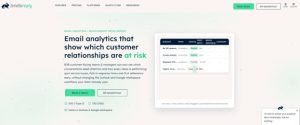
Image via timetoreply
1. timetoreply
The timetoreply tool is a customer service software that measures Outlook, Microsoft 365 and Google Workspace mailboxes you already run. It focuses on response-time analytics rather than replacing your existing email system.
Key features:
- SLA tracking with real-time alerts: In the entry plan, not gated upward.
- Inbox analytics: Reply times performance by mailbox, team and agent.
- Team performance trends: Benchmarking and comparison across teams.
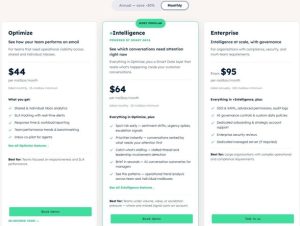
Image via timetoreply
Where it falls short: It sends no replies, so you still need a separate help desk. Deeper analysis costs $64 per mailbox, and a 15-mailbox floor means about $960/month minimum.
Enterprise starts at $9,500/month for 100 minimum mailbox, which, when billed annually, runs high. Its 4.2 G2 score rests on six reviews only.
Pricing:
- Optimize: $44 per mailbox/month
- +Intelligence: $64 per mailbox/month
- Enterprise: $95 per mailbox/month, billed annually
Pro tip: Set the SLA target with your customer first.
Image via Front
2. Front
Front suits teams running complex customer operations across several channels at once. Its Starter plan carries basic analytics, and advanced reporting sits a tier up at a much higher seat price. It also holds the highest rating here, 4.7 across 2,507 reviews.
- Unified omnichannel inbox: Email, chat and more in one shared workspace.
- Tiered analytics: Basic on Starter, advanced on Professional, custom on Enterprise.
- Workflow automation: Routing rules, capped at ten on Starter.
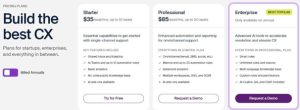 Where it falls short: Starter limits you to just ten seats and basic analytics. Advanced reporting needs the Professional plan, which starts at $85/seat.
Pricing:
- Starter: $35/seat/month, after a 14-day trial.
- Professional: $85/seat/month
- Enterprise: $105/seat/month, billed annually
Pro tip: Price Professional from day one if reply-time trends matter.
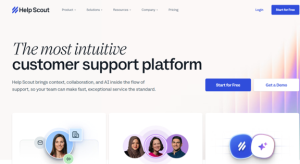
Image via Help Scout
3. Help Scout
Help Scout fits small teams wanting one shared address and a reliable customer support platform. Response-time reporting comes with every paid plan, and it has the only confirmed free tier on this list. Unlimited SLA policies sit at the top tier.
- Shared inbox: One address worked by several people, with assignment and saved replies.
- Docs knowledge base: A self-serve site deflecting repeat questions.
- AI Answers: Automated resolutions, billed at $0.75 each.
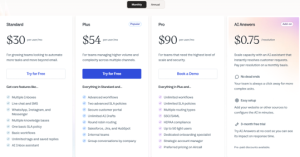
Image via Help Scout
Where it falls short: Unlimited SLA policies are Pro-only at $90 per user. That tier’s ten-user minimum sets a $900 monthly floor.
Pricing:
It has a free plan for one inbox and five users.
- Standard: $30/user/month, with a 15-day trial for all plans
- Plus: $54/user/month
- Pro: $90/user/month
Pro tip: Baseline on the free plan first, if one inbox is enough.

Image via Hiver
4. Hiver
Hiver puts a shared inbox inside Gmail, with an email-agnostic version for Outlook too. Reporting is pre-built on Growth and opens up at Pro, at $65 per user.
- Gmail-native shared inbox: Assignment and collision detection in the mail client.
- Omnichannel coverage: Email, chat, Slack, voice, WhatsApp, social.
- Advanced Analytics: Custom reports and dashboards, from Pro upward.
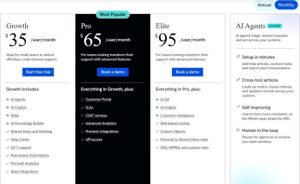
Image via Hiver
Where it falls short: Growth excludes SLAs, Advanced Analytics and API access, and caps you at two inboxes.
Pricing:
- Growth: $35/user/month
- Pro: $65/user/month
- Elite: $95/user/month
Pro tip: Pilot for a month before committing to annual billing.
5. Freshdesk
 Freshdesk is the cheapest paid way into this list. Growth brings email ticketing, AI agents and out-of-the-box analytics, plus a single SLA policy. Multiple SLA policies and custom dashboards start a tier higher. It carries the second-largest review base here of 3,768 reviews.
- Email ticketing with AI agents: Intent detection and action on inbound mail.
- Out-of-the-box analytics: Standard reporting on Growth, with no dashboard customization.
- AI Copilot: In-context suggestions while an agent drafts a reply.
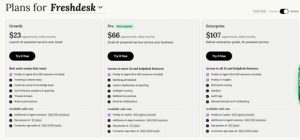
Image via Freshdesk
Where it falls short: Multiple SLA policies and custom dashboards start at Pro for $66 per agent against $23.
Pricing:
- Growth: $23/agent/month
- Pro: $66/agent/month
- Enterprise: $107/agent/month, with a 14-day trial
Pro tip: Budget for Pro, not Growth, if you run more than one SLA.
Which email customer service software tools should you choose?
|
FAQ
- How do you measure email response time?
Measure it in three steps. First, set the start point, when the customer’s email lands. Second, set the stop point, the first human reply or the close. Third, decide whether the clock pauses outside working hours. The argument is usually about step three.
- What is the best software for customer service email?
There is no specific best email customer service software for every team or support model. Pick timetoreply for SLA alerts and Front for multi-channel support. Choose Help Scout for small teams or Hiver for Gmail-based support.
- What is the difference between a shared inbox and an email help desk?
A shared inbox lets several people manage one address with assignments and internal notes. On the other hand, email customer service software with help desk features turns emails into tickets with statuses, queues and SLAs.
- Do I need email customer service software if we already use Outlook or Gmail?
Only if you need answers Outlook and Gmail can’t give you. Neither reports first-response time, resolution time or SLA compliance across a team. If a customer contract names a response target, you need real measurement.
- What is a good first response time for customer emails?
There’s no reliable published benchmark for email, so treat any figure with caution. Set the target from your own contracts and customer mix. Measure your own average first.
- How much does email customer service software cost?
Email customer service software costs from as low as $23 to $44 per user, agent or mailbox each month for entry plans. Minimums can change the real cost, so calculate the total before comparing headline prices.
- Can email customer service software track SLA compliance?
Email customer service software tools can report SLA compliance, but cheaper plans do limit these features. Alerts warn agents before breaches, while configurable policies support different targets for different customers.
- How can I measure agent performance using email help desk software?
Measure each agent’s reply time, handled volume, as well as SLA breaches across customer emails. Use team medians instead of averages.
Final thoughts
Choosing email customer service software for response time analysis comes down to two considerations. What does your plan report? What will it cost after minimums apply?
Similarly, businesses need the right digital foundation to present their services and customer experiences effectively. Using Framer templates helps teams launch professional, CMS-ready websites faster with conversion-focused layouts and flexible structures that can adapt as their business grows.
These five tools share many features, but their plans differ. Check both before you sign. Pair reply-time data with customer satisfaction surveys to see whether faster replies improve customer experience.
Start with a free plan or trial before committing to a contract. Measure your team’s current response times first. Then choose the plan that reports them.