

10 tips to automate repetitive tasks and cut costs for SMBs
Sponsored content. This article was supplied by a third party and Business Money has been paid to publish it.
Small and mid-sized businesses waste an average of 40% of their workday on repetitive manual tasks. Smart automation can reclaim those hours and slash operational costs dramatically.
The spreadsheet entries. The invoice processing. The endless email responses. SMB owners know the grind. These mundane tasks eat away at productivity and drain resources that could fuel actual growth.
Good news: automation has become accessible for businesses of every size. You no longer need enterprise budgets or dedicated IT teams to streamline operations.
This guide delivers ten actionable strategies to automate repetitive work, reduce operational costs, and free your team to focus on high-value activities that actually move the needle.
1. Identify your biggest time drains first
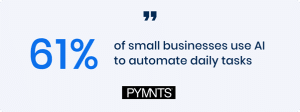
Source: Pymnts
Before investing in any automation tool, you need clarity on where your hours actually go. Many SMB owners assume they know their bottlenecks. The data often tells a different story.
Pro tip: Track your team’s activities for two weeks using a simple time-tracking app. The patterns that emerge will surprise you.
Start by auditing these common time sinks:
- Data entry and transfer between systems
- Email management and routine responses
- Invoice processing and payment follow-ups
- Appointment scheduling and confirmations
- Report generation and distribution
- Social media posting and engagement
- Customer inquiry responses for FAQs
According to McKinsey research, about 60% of occupations have at least 30% of activities that could be automated. For SMBs, this represents massive untapped potential. Many SMBs discover that HR and payroll administration are among their most time-consuming workflows, areas that can be addressed through centralized HR platforms like Omni HR.
Rank your identified tasks by frequency and time consumption. The intersection of “done often” and “takes forever” marks your prime automation targets.
2. Start small with email and communication automation
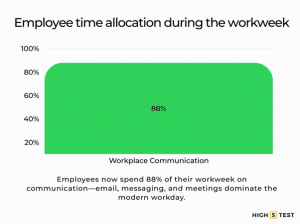
Source: High5Test
Email remains the backbone of business communication. It also devours countless hours daily. The average professional spends 28% of their workday managing email.
You can reclaim significant chunks of that time with simple automation.
Quick wins for email automation:
- Canned responses for frequently asked questions
- Auto-replies with estimated response times
- Email templates for common scenarios
- Filters and rules that sort incoming messages automatically
- Scheduled sends for optimal delivery timing
Tools like Gmail’s built-in features, Outlook rules, or dedicated platforms like Front can transform your inbox management. Set up automatic sorting for client emails, vendor communications, and internal messages. Create folders that populate themselves based on sender or subject keywords.
It is also worth recognising that email overload is not just a tooling problem. In many SMBs, poorly defined hybrid working models increase written communication by default, creating more emails, more clarification loops, and more manual follow-ups than necessary.
For customer-facing communication, chatbots handle routine inquiries around the clock. Modern AI-powered chat solutions answer basic questions, collect contact information, and route complex issues to human team members when necessary.
3. Automate your financial processes
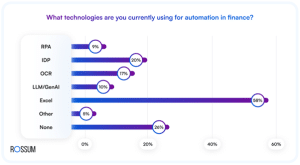
Source: Rossum
Chasing invoices and manually processing international business payments drains energy and creates cash flow headaches. Financial automation delivers immediate ROI for most SMBs.
The impact is real:
Businesses using automated invoicing get paid up to 2x faster than those relying on manual processes. That acceleration alone can transform your cash position.
Prioritize automation for these financial tasks:
- Invoice generation from completed work orders or time logs
- Payment reminders sent automatically at set intervals
- Expense categorization for easier bookkeeping
- Recurring billing for subscription or retainer clients
- Bank reconciliation through accounting software integrations
- Tax document preparation with automated data pulls
Platforms like QuickBooks, FreshBooks, or Wave connect directly to your bank accounts and automate transaction categorization. Set up recurring invoices for regular clients. In a dropshipping business, this can be useful for B2B bulk buyers or subscription-based models that require consistent, scheduled billing. Configure automatic payment reminders at 7, 14, and 30 days past due.
The compounding effect matters here. Each automated financial process eliminates not just the task itself but also the mental overhead of remembering and tracking it.
4. Automate your product pricing to stay competitive
Pricing is one of the most repetitive and critical tasks for SMBs, especially those selling physical products online. Many teams still update prices manually, check competitor websites one by one, or adjust margins using spreadsheets. This slows down decision-making and increases the risk of human error, which ultimately affects revenue.
Automation removes that burden by monitoring competitors continuously and alerting you when key products need price adjustments. Instead of reacting days or weeks later, you can respond to market changes in real time and protect your margins without spending hours on manual research.
Common pricing tasks suitable for automation include:
- Monitoring competitor prices for thousands of SKUs
- Receiving alerts when rivals drop or increase prices
- Tracking pricing trends to identify opportunities
- Standardizing margins across categories
- Generating pricing reports automatically
Pricing automation helps businesses avoid the “race to the bottom” and maintain healthy margins while ensuring customers always see accurate and competitive prices
5. Streamline customer relationship management
Source: Fit Small Business
Your CRM should work for you, not the other way around. Manual data entry into customer databases creates errors and wastes precious selling time.
Modern CRM automation captures and organizes customer interactions without constant human intervention.
Essential CRM automations:
- Lead generation from website forms directly into your database
- Follow-up sequences triggered by specific customer actions
- Deal stage updates based on email responses or meeting completions
- Birthday and anniversary messages sent automatically
- Re-engagement campaigns for dormant customers
When a prospect downloads your whitepaper, automation can add them to your CRM, tag their interests, assign them to a sales rep, and trigger a welcome email sequence. All without anyone lifting a finger.
Reality check: One marketing agency implemented CRM automation and reduced their lead response time from 24 hours to under 5 minutes. Their conversion rate jumped 35% within three months.
Clear internal communication becomes even more important when automation triggers tasks across different teams. Using collaboration tools for teams helps sales, support, and operations stay aligned as automated workflows hand off activities in the background.
The key lies in mapping your customer journey first. Identify every touchpoint where automation can maintain momentum without sacrificing the personal connection.
6. Use integration tools to connect your systems
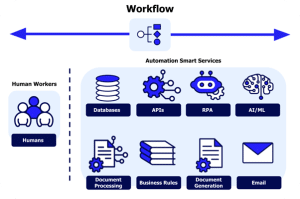
Source: Appian
Most SMBs operate with a patchwork of software solutions. Your accounting platform, CRM, email marketing tool, and project management system likely live in separate silos. This fragmentation creates manual work as teams shuttle data between platforms.
Integration tools eliminate this friction.
Zapier, Make (formerly Integromat), and similar platforms connect thousands of applications without coding. They work on simple “if this, then that” logic. For example, you can integrate your CRM with AI recruitment software to streamline hiring workflows alongside the rest of your tech stack.
High-impact integration examples:
- New form submission → Creates CRM contact → Sends welcome email → Notifies sales team
- Invoice marked paid → Updates project status → Triggers thank you email
- Calendar appointment booked → Creates video meeting link → Sends confirmation with agenda
- Social media mention → Logs in CRM → Alerts account manager
According to Zapier’s productivity report, companies using workflow automation save an average of 10 hours per week. That translates to over 500 hours annually per employee.
Start with your most frequent cross-platform tasks. Build simple two-step automations first. As confidence grows, create more complex workflows that touch multiple systems.
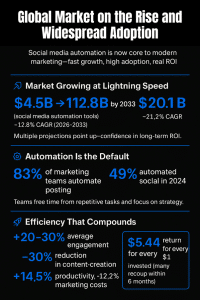
7. Automate social media and content distribution
Source: Templated
Maintaining an active social media presence feels like a full-time job. Posting consistently across multiple platforms, responding to comments, and tracking performance demands constant attention.
Automation handles the heavy lifting while preserving authentic engagement. For teams repurposing written content into visual formats, using an AI video maker makes it easier to turn blog posts into short social-ready videos without adding manual production work.
Social media automation wins:
- Batch scheduling posts weeks in advance
- Cross-platform publishing from a single dashboard
- RSS-to-social feeds that share new blog content automatically
- Comment monitoring with keyword alerts
- Performance reporting delivered to your inbox weekly
Tools like Buffer, Hootsuite, or Later let you dedicate one focused session weekly to planning content. The platform handles distribution according to your schedule. Your audience sees consistent activity while you focus elsewhere.
Heads up: Automation should enhance engagement, not replace it. Schedule your posts automatically, but set aside time daily for genuine interactions. Responding personally to comments and messages builds relationships that automated responses cannot replicate.
Track which content types and posting times generate the strongest engagement. Let automation handle distribution while you double down on creating content that resonates.
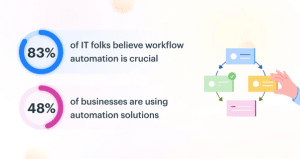
8. Implement document and workflow automation
Source: KissFlow
Paper trails and manual approvals create bottlenecks throughout organizations. Document automation accelerates processes while reducing errors.
Consider how much time your team spends on:
- Contract generation and signature collection
- Proposal creation with custom pricing
- Onboarding paperwork for new clients or employees
- Approval workflows that require multiple sign-offs
- Report compilation from various data sources
Many SMBs streamline these processes further by using tools that simplify client communication, helping teams collect documents and information without the constant back-and-forth. This reduces errors and ensures every stakeholder submits the right details the first time.
E-signature platforms like DocuSign or PandaDoc slash contract turnaround times from days to hours. Template libraries let you generate customized proposals in minutes rather than building from scratch each time.
AI proposal makers such as Storydoc allow you to personalize proposals at scale by integrating with CRMs and other tools via Zapier or native integrations, automatically pulling in client data, pricing, and relevant content without manual work.
Power user tip: Create document templates with merge fields that pull data directly from your CRM. A new proposal can auto-populate with client name, address, custom pricing, and relevant case studies based on their industry.
Workflow automation tools like Monday.com, Asana, or ClickUp route tasks automatically based on completion status. When one team member finishes their portion, the next person receives notification instantly. No status meetings required.
9. Measure, iterate, and scale your automation
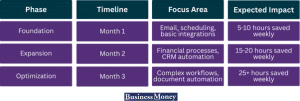 Automation requires ongoing refinement. Set clear metrics before implementing any new automation and track performance consistently.
Key metrics to monitor:
- Time saved per task or process
- Error rates before and after automation
- Cost reduction in labor hours or direct expenses
- Customer satisfaction scores for automated touchpoints
- Employee satisfaction with automated workflows
Review automation performance monthly during the first quarter. Some workflows will exceed expectations. Others will need adjustment or replacement.
Build your automation roadmap
Start conservatively. Master each automation before adding complexity. Rushing implementation creates fragile systems that break at inconvenient moments.
As you scale your automation efforts, it’s important to understand how industry leaders approach scaling operations efficiently. Marketing teams and SEO professionals face similar challenges – automating repetitive tasks to focus on high-value activities.
Learning how organizations implement modern SEO strategies for scaling automation can provide valuable insights into workflow optimization, content distribution automation, and measuring the ROI of your scaling efforts. The principles of efficient automation apply across all business functions, from finance to marketing.
10. Automate referral and reward programs to drive low-cost growth
Customer referrals are one of the most cost-effective growth channels for SMBs, but running referral programs manually is time-consuming and error-prone. Tracking who referred whom, issuing rewards, following up, and reporting results quickly turns into yet another repetitive task that eats up hours.
Automation removes that burden entirely.
Referral automation tools like ReferralCandy allow SMBs to:
- Automatically generate and track referral links
- Attribute new customers to the right referrer
- Issue rewards instantly when referrals convert
- Send automated reminders and updates to advocates
- Monitor referral performance without manual reporting
Instead of your team manually managing spreadsheets or sending one-off emails, the entire referral workflow runs in the background. Customers get rewarded on time, advocates stay engaged, and your business acquires new customers at a fraction of the cost of paid ads.
For SMBs looking to cut acquisition costs while scaling efficiently, automating referrals turns existing customers into an always-on sales channel, without adding operational complexity or headcount.
Your automation action plan
Automation transforms SMBs from reactive to proactive. The businesses thriving in 2026 have systematically eliminated manual work from their core operations. They compete with larger organizations by maximizing every team member’s impact.
In numbers:
- Average SMB employee spends 23% of time on automatable tasks
- That equals roughly 9 hours weekly per person
- For a 10-person team: 90 hours weekly wasted
- Annual cost at $25/hour: $117,000 in lost productivity
You cannot afford to leave that value on the table.
How to start:
- Audit your team’s time for 5 business days
- Identify your top 3 repetitive tasks
- Research one automation tool for your biggest pain point
- Implement a single simple automation
- Measure results for 30 days
The goal remains consistent: free your team from mundane work so they can focus on activities that require human creativity, judgment, and connection. Automation handles the rest. Your competitors are already automating. The question becomes: how quickly will you catch up?