

Best crypto payment plugins for WooCommerce & OpenCart
Sponsored content. This article was supplied by a third party and Business Money has been paid to publish it.
Best crypto payment plugins for WooCommerce and OpenCart stores
Not all crypto payment plugin for ecommerce work the same way. Some hold merchant funds and require withdrawals, while others simply automate payment tracking and send funds directly to your wallet.
At Bcon Global, we believe cryptocurrency should work as blockchain technology was originally designed.
Why add cryptocurrency payments to your online store?
If you are reading this article, you already understand the advantages of cryptocurrency payments and the level of demand for this payment option. Even if you are not very familiar with this field, offering cryptocurrency payments will not be unnecessary and will only expand the options and convenience available to your customers.
For online stores, crypto payments provide several practical benefits:
- An additional payment method that improves customer experience
- Greater flexibility by allowing customers to pay using their preferred cryptocurrency
- Diversification of payment channels and reduced dependence on a single provider
- Access to a growing audience of cryptocurrency users
- Support for multiple blockchains, stablecoins, and digital assets
- Transparent payment tracking through public blockchain networks
- Fast settlement directly to merchant-controlled wallets
With Bcon Global, merchants connect their own wallet addresses and receive payments directly from customers without the service holding funds at any stage.
How crypto payment plugins work for e-commerce
https://bcon.global/how-to-start-accepting-crypto-payments-with-the-bcon-new-address-api-function/
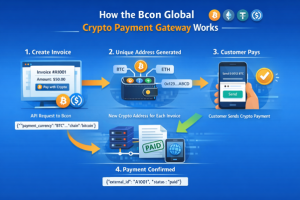
A crypto payment plugin connects your store checkout page to a payment gateway. When a customer places an order, the plugin automatically creates an invoice and displays payment instructions.
The payment gateway checks the payment status on the blockchain and sends this information to the plugin on your website, which in turn updates the order statuses within your system.
Installation and setup process
Bcon Global provides ready-made plugins for WooCommerce and OpenCart. After installation, merchants create a store inside their Bcon account, configure wallet addresses, and connect their API key.
The plugin then handles:
- Invoice creation
- Payment amount calculation
- Blockchain monitoring
- Payment status updates
- Order confirmation notifications
This allows merchants to begin accepting cryptocurrency without building a custom integration.
Supported platforms: WooCommerce, OpenCart and more
WooCommerce and OpenCart remain two of the most common eCommerce platforms for cryptocurrency payments.
For businesses requiring additional flexibility, Bcon Global also offers a REST API.
Key features of a good crypto payment plugin
Our plugins provides extensive customization options, including order status mapping, customization of payment method names and titles, enabling or disabling JavaScript, design configuration, and other advanced settings.
Multi-currency and multi-blockchain support
Source: https://bcon.global/accept-usdt-payments-on-website/
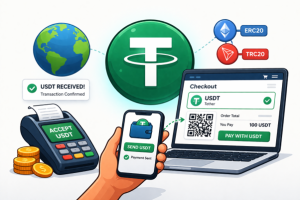
Customers use different blockchains and payment methods. A good plugin should support both major cryptocurrencies and stablecoins.
Bcon Global currently supports payments on this blockchains:
- Bitcoin (BTC)
- Ethereum (ETH)
- BNB Chain ( BEP-20 )
- Solana (SOL)
- TRON (TRX)
Supported assets include native coins of the blockchains and USDT, USDC, USDS, TUSD, WBTC, WETH.
Automatic fiat-to-crypto conversion for invoices
Most online stores display prices in fiat currencies such as USD or EUR.
Bcon automatically calculates the required cryptocurrency amount during invoice creation. Merchants can specify the product price in fiat currency while the system converts it into the selected cryptocurrency using current exchange rates. This simplifies checkout and reduces pricing errors.
Fees and settlement speed
Many payment providers receive customer payments first and only later transfer funds to merchants.
Bcon Global follows a different approach. Customer payments are sent directly to merchant wallets, while the gateway only tracks transactions and payment statuses. Because the platform never controls merchant funds, there are no withdrawal requests or payout delays.
Service fees are accounted for separately through the merchant balance rather than being deducted from incoming payments.
Comparing popular crypto payment plugins
| Feature | Bcon Global | Coinbase Commerce | BitPay | CoinPayments | NOWPayments |
| Non-custodial model | Yes | Yes | No (hybrid custody options) | Partial | Yes |
| Direct wallet payments | Yes | Yes | Limited | Yes | Yes |
| Requires private keys | No | No | No | No | No |
| WooCommerce plugin | Yes | Yes | Yes | Yes | Yes |
| OpenCart plugin | Yes | Limited | Yes | Yes | Yes |
| REST API | Yes | Yes | Yes | Yes | Yes |
| Fiat-to-crypto conversion | Yes | Limited | Yes | Yes | Yes |
| Payment callbacks / Webhooks | Yes | Yes | Yes | Yes | Yes |
| Merchant KYC required | No | Yes | Yes | Partial | Optional / depends |
| Controls merchant funds | No | No | Yes | Partial | No |
| Order status mapping | Advanced | Basic | Basic | Medium | Medium |
| Payment method customization | Full control | Limited | Limited | Medium | Medium |
| JavaScript control (enable/disable) | Yes | No | No | No | No |
| Design & UI customization | Advanced | Low | Low | Medium | Medium |
| Plugin-level configuration flexibility | High | Medium | Medium | Medium | Medium |
FAQ
Does Bcon Global hold merchant funds?
No. Payments are sent directly to merchant-controlled wallet addresses.
Does Bcon require private keys?
No. Only public wallet addresses are required.
Can I use Bcon with WooCommerce?
Yes. A dedicated WooCommerce plugin is available.
Can I use Bcon with OpenCart?
Yes. Bcon Global provides a ready-made OpenCart integration.
Does Bcon support API integrations?
Yes. Developers can integrate directly through the REST API and use callbacks for payment status updates.