

Best email spam checker tools: Is it your words, your domain or a blacklist?
Sponsored content. This article was supplied by a third party and Business Money has been paid to publish it.
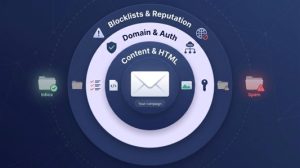 Roughly one in eight marketing emails misses the inbox. Validity’s 2026 Email Deliverability Benchmark Report puts global inbox placement at 87.2 percent, and every message that lands in spam or goes missing costs revenue. Gmail’s bulk-sender rules (in force since February 2024, with stricter enforcement from November 2025) require SPF, DKIM, DMARC, a one-click unsubscribe header for marketing mail, and spam complaints below 0.1 percent, so a single “spam score” tells only part of the story. Before you send, you must know which layer is leaking: content, authentication, or blacklist reputation. This guide pairs 11 diagnostic tools with those layers so you can locate the problem, patch it quickly, and keep every revenue-driving email visible.
The best email spam checker tools at a glance
Want a quick shortlist before you read the deep dives? The table below shows which layer each tool tests, whether it reports live inbox placement, how much you can try for free, and the lowest publicly listed price. Prices as listed on each vendor’s site in October 2026.
| Tool | Best for | Key test focus | Live placement? | Free tier | Entry price* |
| InboxArmy | Free seed placement test from an email agency that also offers deliverability help | Placement, auth, spam score and blocklists | Yes (Gmail, Outlook, Yahoo and more) | Free test | Free |
| GlockApps | Folder-level insight across major providers | Seed list plus content and auth | Yes | 2 tests | $16.99 for 3 credits |
| SendForensics | Ongoing monitoring with DMARC and previews | Seed list plus analytics | Yes | None | $49/month |
| Mail-Tester | Lightning static score, no signup | Content and auth | No | 3 tests per day | $10/month |
| MailGenius | Broad technical audit with AI tips on paid plans | Content and auth | Placement previews | Free basic test | $23/month |
| Unspam | Budget-friendly mix of placement, previews, heatmaps | Seed list plus content and UX | Yes (10 seed mailboxes) | 5 spam plus 3 placement tests a month | $5 monthly minimum, pay per test |
| MXToolbox | Deep DNS and blocklist forensics | Auth and blocklists | Paid plans (30 tests a month) | Weekly blacklist monitoring, 1 domain | $129/month |
| InboxAlly | Reputation recovery via automated warm-up | Seed list plus engagement | Yes (16 seed inboxes) | 1 placement test per day | $149/month |
| Folderly | Modular suite you can mix and match | Multi-layer diagnostics | Yes | 2 tests per month | $79/month for 100 tests |
| Mailgun Inspect | Rendering QA plus spam-content checks | Content and rendering | No | First month free | $99/month |
| Litmus / Validity Engage | Enterprise-grade integrated intelligence | Multi (placement, QA, monitoring) | Yes | None | No public price |
Entry price is the lowest self-service or advertised monthly cost, unless otherwise noted.
Keep this grid in mind as you read on; the detailed reviews explain the fine print behind each “yes,” “no,” and footnote.
The 11 best email spam checker tools, reviewed
InboxArmy: Best free starting point when a quick check might reveal a bigger issue
InboxArmy’s free Email Deliverability Test is a seed placement test. You add a short code to your email, send it from your email account or marketing system to the test addresses the page lists, and the report shows whether the message reached the inbox, the Promotions tab or the spam folder at Gmail, Outlook, Yahoo and other providers. The same report covers SPF, DKIM and DMARC results, a spam score and blacklist status. Because the test is free, the marketing team can run it shortly before a campaign goes live.
InboxArmy is a full-service email marketing agency that works across 40+ email service providers. If the test points to deeper reputation trouble, its deliverability service covers audits, authentication fixes, list hygiene, warm-up and ongoing monitoring. For brands heading into peak season, a free self-serve test with an agency behind it is a practical first step.
Why it helps
- Free entry removes every excuse to skip a pre-send test.
- One report shows placement, authentication, spam score and blacklist status together, so you can see which layer needs work.
- You can share the report with your team through a link.
What to check first
As with any seed test, send a staging version of the campaign that uses placeholder customer details instead of live personal data. Send it from the same domain and platform you use for the real campaign, so the result reflects production.
Try the free test first. InboxArmy’s test puts inbox placement next to a spam score and SPF, DKIM, DMARC and blacklist results, so you can see whether content, authentication or reputation is the likely problem. Before you run it, you can learn more about what the test checks and how to send to its test addresses.
GlockApps: Best for folder-level inbox diagnostics
Send one test and GlockApps shows where your email lands at the major ISPs, including Gmail, Outlook, Yahoo and AOL, with inbox or spam placement for each. That gives your team quick evidence when Gmail filters a sale blast that Outlook delivers to the inbox.
Each test also:
- Scores the message against Google, Barracuda and SpamAssassin filters
- Checks SPF, DKIM, and DMARC authentication
- Checks your domain and IPs against 50+ blocklists
- Reviews message size, images and links, with an HTML checker
Pricing
Two free tests. Credit packs start at $16.99 for three tests, valid for one month, so budget monthly rather than quarterly. Subscriptions run from $59 to $129 per month on annual billing. High-volume senders can automate tests through the API or set up automatic tests and alerts.
Why it helps
- Folder-level visibility pinpoints provider-specific problems
- One consolidated report keeps creative, dev, and deliverability teams aligned
- API hooks slot into CI pipelines for hands-off QA
Watch-outs
GlockApps’ seed panel is proprietary; treat results as directional, not absolute. Review privacy terms and panel breadth annually, especially before testing messages that contain customer data.
When you need proof of placement shortly before launch, GlockApps gives you a provider-by-provider snapshot.
SendForensics: Best value for frequent testing and continuous monitoring
One $49/month subscription covers spam tests, live inbox placement tests, DMARC analytics, client previews, and alerts by email, Slack or webhook when an IP is blacklisted or the complaint rate climbs. For brands running weekly drops and automated flows, that breadth cuts down on tab hopping.
The deliverability analysis checks an email for 100+ potential problems across content, infrastructure and reputation: weighted words and code strings, SPF, DKIM, DMARC, rDNS, blacklists, and Google and Microsoft reputation. A reputation dashboard keeps deliverability scores, complaint rates and blacklist history in one place, so slow declines are easier to spot.
Pricing and limits
- $49/month or $39/month when billed annually
- Unlimited spam tests, client previews and placement tests, under a fair-use policy of 1,000 deliverability analyses and 50 seed-list placement tests per sending domain each month
- 2 sending domains and 2 users on the entry plan
Why it helps
- One login replaces several niche tools, easing onboarding
- Historical trend lines catch slow declines that one-off tests miss
- ISO 27001:2022 certification and GDPR compliance help with security reviews
Watch-outs
SendForensics lists no free plan on its pricing page, so expect to pay from the first month. Its seed list is its own; treat placement results as directional guidance, not an absolute verdict.
Mail-Tester: Best no-signup static score for lightning checks
Need a quick pass or fail signal before launch? Copy the random Mail-Tester address, send your draft to it, and click to check your score. As soon as the message arrives, you see a score out of 10, a SpamAssassin breakdown, and a report on your message, mail server and sending IP that shows what is and is not configured properly.
The appeal is speed and zero friction: no login, no credit card. You get 3 free tests every 24 hours, which is plenty for subject-line tweaks or image swaps ahead of a flash sale.
Pricing
- $10/month buys 50 tests and unlocks JSON/iframe embeds for staging workflows.
- Free reports stay online for 7 days and anyone with the test address can see them; avoid sending live coupon links or personal data.
Why it helps
- Instant clarity on whether the basics pass or fail.
- Each SpamAssassin rule is spelled out so copywriters know exactly what to fix.
- Low monthly cost if you outgrow the free trio.
Limitations
Mail-Tester doesn’t mimic Gmail or Outlook.com filters and can’t tell you if a message lands in Promotions or Primary. Treat the score like a smoke detector: if it’s quiet but revenue still drops, move on to a placement tester.
MailGenius: Best broad free technical audit with AI guardrails
Send one test email to the on-screen address and MailGenius checks SPF, DKIM, DMARC, reverse DNS, blacklists, broken links, the one-click unsubscribe header, and even the age of your sending domain. The basic version is free and needs no account.
Paid plans add an AI deliverability consultant and an AI copywriting analysis and rewrite, which turn findings into plain next steps.
Pricing
- Free basic version, no account needed
- $23/month for 60 tests
- $39/month for unlimited manual tests
- $79/month tests every email you send automatically and adds blacklist monitoring and alerts for unlimited domains
Yearly billing saves 20 percent.
Why it helps
- Comprehensive checklist catches obscure issues, such as missing List-Unsubscribe headers.
- AI explanations on paid plans translate technical jargon into plain next steps.
- Unlimited manual tests from $39/month suit teams that test often.
Watch-outs
MailGenius says all tests are hosted on public links, so use placeholder data in test sends. Its inbox placement previews cover Gmail, Outlook, Yahoo and more; treat them as guidance, not gospel.
Unspam: Best low-cost combo of placement, previews, and heatmaps
Unspam combines a spam score, an inbox placement test across 10 seed mailboxes at Gmail, Outlook, Yahoo and 4 more providers, and previews in 50+ real clients and devices. No tab explosion, no extra logins. It is ideal for lean ecommerce teams tweaking creative on a Monday sprint.
Free allowance (5+3)
You get 5 spam tests and 3 placement tests each month, enough to vet a new welcome flow and one promo without touching a credit card. The free plan also includes device previews and heatmaps. When you outgrow it, the Custom plan charges per test above a $5 monthly minimum, with rates that drop as volume grows.
Why it helps
- One send covers spam score, live placement, and design-critical previews.
- An AI eye-tracking heatmap predicts where readers look first, which helps with CTA placement before A/B tests.
- An AI assistant reads your results and points to what to fix, from authentication to content.
Watch-outs
Use placeholder data rather than live customer details or unreleased offers in test sends. The placement test uses 10 seed mailboxes across 7 providers, so treat the results as directional rather than definitive.
If you need an affordable tool that checks technical, creative, and UX boxes without forcing an annual contract, Unspam is worth a place in your QA stack.
MXToolbox: Best for deep DNS, authentication, and blocklist forensics
When your copy is clean but delivery still collapses, the culprit is usually infrastructure. Drop your domain or IP into MXToolbox and its free tools check SPF, DKIM, and DMARC records, reverse DNS, open relays, and 105 DNS-based blacklists.
Free tier
Weekly blacklist monitoring for one domain at no cost, plus the free lookup tools, which are often enough to spot a typo in yesterday’s SPF update.
Delivery Center
- $129/month adds 30 inbox placement tests a month, adaptive blacklist monitoring of all your senders, recipient complaint reporting, DMARC delivery reports, and SPF, DKIM and DMARC configuration analysis for up to 5 domains.
Why it helps
- Granular DNS diagnostics surface mismatched hostnames and rogue senders that generic SaaS checkers miss.
- Delivery Center alerts you when your senders’ blacklist reputation changes, ideally before a sale-day blast gets throttled.
- An API lets you add health checks to your own pipelines, so problems surface in staging, not production.
Limitations
MXToolbox focuses on infrastructure. It won’t preview dark-mode HTML or flag copy that trips SpamAssassin. The subscription can feel steep for occasional use, so reserve it for high-volume domains where one blocklist listing could cost five-figure revenue.
Use MXToolbox when the question is “What’s wrong with our foundation?” not “Will this GIF land in Promotions?” It is the quickest way to uncover hidden DNS flaws or reputation hits a content tool can’t see.
InboxAlly: Best for reputation recovery when placement already hurts
Some tools spot trouble; InboxAlly aims to fix it. It pairs diagnostics with a seed engagement network: its seed addresses take engagement actions at a human pace, such as pulling messages out of Spam or Promotions, to help mailbox providers trust your domain again.
Free placement tester
Send a real campaign to 16 tester inboxes at Gmail, Outlook and Yahoo and see Inbox or Spam for each provider. The free tester allows one test per day.
Paid remediation
- Plans start at $149/month, which lets you send to 100 of InboxAlly’s seed addresses per day; a 10-day free trial needs no credit card.
- Live blacklist monitoring and DMARC reporting run in the app, so new infrastructure hiccups don’t undo progress.
- A REST API and native integrations with HubSpot, Klaviyo and more let retention teams fold warm-up into regular sends.
Why it helps
- Active remediation loops engagement signals back to providers instead of handing you a static scorecard.
- Background monitoring catches fresh issues before the next blast.
- Integrations streamline warm-up alongside existing flows.
Watch-outs
Automated engagement must be used ethically. If real subscriber interaction stays low, mailbox providers may penalize artificial opens or replies. At $149/month, InboxAlly makes sense only when spam-folder placement is already suppressing revenue; lighter diagnostic tools cost less when placement is healthy.
Reach for InboxAlly when conversion curves dip, complaint rates climb, and your domain needs a structured rehabilitation plan, not just another report.
Folderly: Best emerging modular suite for growing brands
Folderly treats deliverability like a pick-and-mix. Choose only the modules you need: Inbox Insights for placement, Flash for message testing, Lens for DNS health, Pulse for live monitoring, and Mirror for render previews (now in beta). That flexibility matters when you are scaling fast and do not want an enterprise bundle.
Free and paid tiers
- 2 free placement tests each month
- $79/month buys 100 Inbox Insights tests a month (placement, IPs and DNS records)
- Pulse monitors placement over time and sends alerts, with a free tier; Flash checks a real test email for authentication and content; Lens inspects DNS, authentication, reverse DNS and blocklist signals.
Why it helps
- Modular pricing means you pay only for the diagnostics you need, ideal for rapidly growing lists.
- Folderly AI drafts campaigns from your offer, audience and goal, then points to the next useful check.
- Newer products, such as Mirror previews (beta) and Folderly DMARC (pilot), show an active product team.
Watch-outs
Managing several modules and invoices can feel messy. Mirror is still in beta and Folderly DMARC is a pilot, so plan hands-on validation before moving them into production workflows.
If you prefer a menu of focused diagnostics instead of an all-or-nothing contract, Folderly deserves a test run.
Mailgun Inspect: best for rendering QA plus spam-content checks
Copy and authentication may pass, yet one Outlook desktop glitch can tank conversions. Mailgun Inspect, the email preview and QA platform Mailgun built with the best of Email on Acid, tackles that creative risk.
Send one test and Inspect renders previews across 100+ clients and devices, with dark mode checks built in. The Premium plan adds spam content checks, HTML code analysis, link and image validation, and accessibility tests, so issues surface long before the deliverability team takes the blame.
Pricing
- Basic $99/month after a free first month: 1,000 previews a month across 100+ clients and devices
- Premium $199/month after a free first month: 2,000 previews plus accessibility tests, HTML code analysis, link and image validation, and spam content checks
Both plans include API access, so developers can add rendering tests to their build process.
Why it helps
- Side-by-side previews stop design breaks before they reach six-figure segments.
- Link validation on Premium catches broken links that siphon conversion dollars.
- API hooks automate creative QA inside CI pipelines.
Watch-outs
Inspect does not run live seed placement or blocklist diagnostics, so pair it with a placement tester when deliverability, not design, is under review. Because spam checks live only on Premium, confirm the extra $100 fits the value of catching those issues earlier.
Choose Inspect when flawless rendering and reliable links carry as much weight as inbox placement; it keeps creative, CRO, and deliverability teams equally confident.
Litmus / Validity Engage: best for large-scale programs that need integrated intelligence
When you send millions of messages each month, single-purpose checkers fall short. Litmus is now part of Validity Engage, which combines AI-assisted email building and testing across 100+ email clients, inbox placement, spam trap detection and sender reputation monitoring, so retention, creative, and deliverability teams work from one platform.
Placement reporting shows where campaigns land, and previews across 100+ clients, including dark mode, help ensure that a holiday GIF does not break on Outlook.
The differentiator is continuous monitoring: Engage watches deployed emails around the clock for failing links and broken renders, tracks signals such as inbox placement, list health and sender reputation, and flags problems before a small issue snowballs. It sits alongside your existing ESP rather than replacing it.
Why it works for enterprise
- Unified view of creative quality, infrastructure health, and real-world placement
- Historical trend lines surface slow-burn reputation issues invisible in one-off tests
- Built for enterprise marketing teams running email at scale across brands or regions
Considerations
 You will talk to sales before you see a price, and the feature depth can overwhelm smaller senders who need only a SpamAssassin check. Weigh the investment against annual email revenue and the staff hours now spent juggling several siloed tools.
If email drives seven- or eight-figure revenue and multiple teams touch the channel daily, Validity Engage delivers the integrated intelligence stack that keeps creative, operations, and leadership aligned.
Is it your words, your domain, or a blocklist?
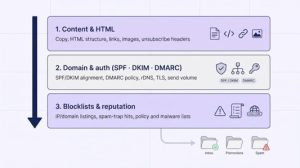
Most deliverability failures trace back to one of three layers:
- the message itself,
- the sender’s technical footprint, or
- an external reputation hit, such as a blocklist entry.
Identify the right layer first; otherwise you will keep rewriting subject lines while Gmail keeps sending mail to spam.
1. Content and HTML problems
Filters still score every tag, link, and word.
Broken HTML is a silent killer. One unclosed <table> can corrupt MIME structure and trigger SpamAssassin rules. Alt text, the text-to-image ratio, and a plain-text alternative matter as well. Heavy images with little copy often land in Gmail’s Promotions tab even when authentication is perfect.
Links get equal scrutiny. Public shorteners like bit.ly inherit the worst reputation of anyone who has ever used them. If that domain is block-listed, every campaign you send with it carries the same baggage.
Keywords such as free, discount, or sale are rarely fatal on their own in 2026; they become risky only when combined with poor alignment, shady links, or disengaged recipients.
Action plan
- Run HTML through a linter before the first test send.
- Keep at least a 60:40 text-to-image ratio (screenshots of coupons do not count as text).
- Host links on a domain you control; avoid public shorteners for promotions.
- Add a visible, one-click unsubscribe header to meet Gmail’s bulk-sender rule.
- Pass the final build through a content checker (Mail-Tester, MailGenius, or Flash) to catch stray SpamAssassin triggers.
Fix these items and many “mystery” spam placements disappear without touching DNS.
2. Domain, authentication, and sending infrastructure
SPF authorizes sending IPs, DKIM signs the message, and DMARC links both to the visible From domain. Gmail, Yahoo, and Microsoft now consider this trio table stakes; Gmail also warns bulk senders to keep spam complaints below 0.1 percent.
Alignment matters. A message can pass SPF and DKIM yet fail DMARC if the domains do not match. Reverse DNS, valid TLS, and a consistent HELO hostname round out the hygiene list.
New domains mimic spammer throwaways. Ramp volume gradually, starting with a few hundred messages a day, and watch complaint rates. Microsoft requires SPF, DKIM and DMARC from domains that send more than 5,000 messages a day to Outlook.com consumer mailboxes, and non-compliant mail can be rejected with error 550 5.7.515.
Quick-fix checklist
- Publish a restrictive SPF record that lists every legitimate sender, and nothing else.
- Sign all traffic with 2,048-bit DKIM keys; rotate them yearly.
- Enforce DMARC at p=quarantine (or stricter) once pass rates exceed 99 percent.
- Add an RFC 8058 one-click List-Unsubscribe header.
- Use a dedicated tracking subdomain so link reputation grows with the primary brand.
3. Blocklists: critical signal, rarely the whole answer
Blocklists record bad behavior (spam, malware, or policy abuse) by IP, domain, or URL. They come in three main flavors:
- connection-stage IP lists (for example, Spamhaus SBL)
- content-stage domain or URL lists
- policy or malware lists
Not every list carries equal weight: a listing on a major list such as Spamhaus matters far more than one on an obscure list, so a long list count is not the same as better coverage.
A minor policy list ignored by Gmail may still matter to a regional ISP, so check which providers your audience uses before you prioritize a delisting request.
Never request delisting before fixing the root cause; providers share data, and a fresh complaint wave can relist you quickly.
Rapid-response playbook
- Confirm the listing on the operator’s own site; third-party data can lag.
- Map the list to affected providers, and prioritize Gmail and Outlook.com if they use it.
- Identify the trigger: spam spike, compromised form, or new link domain.
- Fix the cause, document the change, then request delisting.
- Monitor daily for a week; repeat offenders face longer lockouts.
Blocklists are smoke alarms, not verdicts. Trace the fire and make sure it cannot reignite.
Why one tool shows 10/10 while another flashes a warning
Run the same campaign through three checkers and you might see a perfect 10, a cautious 7, and a bright-red fail. The gap is not vendor trickery; each tool measures a different slice of deliverability.
- Mail-Tester flips the raw SpamAssassin score, so a higher number is better.
- GlockApps combines Google, Barracuda and SpamAssassin filter scores with live placement, so a Gmail spam-folder result shows up even when a static score looks fine.
- MXToolbox checks infrastructure, so it flags a broken reverse DNS record even when the copy is pristine.
Weightings differ, too. One product may treat a minor policy blocklist as fatal while another ignores it. Seed panels vary by region and engagement, so placement results can swing on factors your real list never sees.
Keep comparisons sane
- Replicate production. Use the same domain, IP, and ESP you will use in the live send.
- Change one variable at a time, then retest to see what moved the score.
- Cross-check with provider data such as Gmail Postmaster spam rate, Outlook.com error codes, and click-through trends.
- Watch trends, not snapshots. A slow three-test decline is more important than one sudden yellow light.
- Log the date, time, and route for each test so you can compare like with like later.
A practical testing workflow for ecommerce and lifecycle campaigns
1. Before you launch a new template or automation
- Static checks. Run the draft through Mail-Tester or MailGenius to fix authentication gaps, broken links, and obvious SpamAssassin flags.
- Placement test. Send the cleaned message to GlockApps, SendForensics, or Unspam. Note folder placement (Inbox, Promotions, Spam), tab (Primary vs. Other), and Missing status for Gmail, Outlook.com, and Yahoo.
- Creative preview. Render the email in Mailgun Inspect across 100+ clients. Watch for clipped images, dark-mode logo issues, or Outlook table breaks.
- Re-test. After fixes, repeat steps 1-3. When scores stay stable for forty-eight hours, schedule the automation.
Total prep: under sixty minutes; prevents day-one spam surprises.
2. Six weeks before peak-season volume
- Audit SPF, DKIM, and DMARC. Replace 2,048-bit keys older than one year and add missing IPs.
- Clean the list. Suppress contacts with zero clicks in twelve months, and keep the Gmail complaint rate below 0.1 percent.
- Baseline placement. Test core templates (welcome, cart, promo) and compare results with last quarter.
- Daily blocklist sweep (fourteen days). Catch listings triggered by volume spikes; remediate and delist before paid traffic ramps.
- Controlled ramp. Increase daily sends by no more than twenty percent every forty-eight hours while watching complaints and bounces.
Arrive at Black Friday with infrastructure, reputation, and creative locked.
3. After a migration or domain change
- Map every sender. Marketing, transactional, and support streams must update SPF and DKIM.
- DMARC glide. Start at p=none; move to quarantine, then reject after pass rates exceed 99 percent.
- A/B placement. Send identical campaigns from old and new routes via GlockApps or SendForensics; compare Inbox vs. Spam.
- Migrate suppressions. Import all bounces, complaints, and unsubscribes.
- Warm volume. Begin at ten percent of historical daily send; double every seventy-two hours while monitoring complaints and bounces.
- Final verification. When placement matches or beats the old baseline and no new blocklists appear, decommission the legacy stack.
Follow this three-phase workflow and you will ship new creative, survive peak season, and migrate infrastructure without panicked list pulls or last-minute firefighting.
Free versus paid spam checkers: when does the investment pay?
A free checker such as Mail-Tester or InboxArmy’s deliverability test catches obvious errors at $0, and that alone can save thousands in missed clicks. As volume and revenue per send grow, three paid advantages emerge.
- Time. A $49/month SendForensics plan can test automatically through an ESP integration, which removes daily manual copy-paste.
- Insight. Seed-placement grids, trend dashboards, and live blocklist alerts surface issues a free score never sees.
- Accountability. Historical reports prove you fixed the problem when finance asks why revenue dipped last Tuesday.
Run the math: a campaign to 500,000 subscribers that loses 4 percent inbox placement at $0.08 revenue per inboxed recipient costs $1,600, more than a full year of most mid-tier plans. Add staff hours spent diagnosing without proper tools and the ROI widens even further.
When to pay
- Fewer than 50,000 sends a month on a single domain → free tools or pay-as-you-go credits usually suffice.
- 50,000-250,000 sends a month or multiple brands → step up to a monthly suite with monitoring.
- More than 250,000 sends a month or seven-figure annual email revenue → invest in placement, blocklist, DMARC, and rendering coverage, plus budget for emergency remediation.
Match the tool tier to revenue at risk, not list-size bragging rights. If the subscription feels expensive next to the margin it protects, you are not losing enough to need it yet.
Email deliverability changes to watch in 2026
Gmail: Bulk-sender rules are now firm
Since February 2024, any domain that sends about 5,000 messages a day to personal Gmail accounts counts as a bulk sender, and from November 2025 Gmail stepped up enforcement against non-compliant traffic. Bulk senders must:
- Pass SPF, DKIM, and DMARC
- Include a one-click unsubscribe header in marketing messages
- Keep spam complaints below 0.1 percent and never let them reach 0.3 percent
Audit every active subdomain, including legacy transactional hosts, for alignment. Replace mailto-based unsubscribes with HTTPS one-click endpoints Gmail can parse automatically, then watch Postmaster Tools daily during promotions.
Outlook.com: Authentication required for high volume
Since May 5, 2025, Microsoft has required SPF, DKIM and DMARC from domains that send more than 5,000 messages a day to Outlook.com consumer mailboxes. Non-compliant mail first went to Junk; Microsoft’s support page now describes rejection with error 550 5.7.515.
Safeguards
- Split marketing and transactional streams onto dedicated, aligned subdomains.
- Monitor daily send volume per provider; cross 5,000 intentionally, not by accident.
- Pause the blast, fix alignment, and retest before resuming when a 5.7.515 appears.
AI scores: treat them as suggestions, not verdicts
Many tools now add AI layers: MailGenius rewrites email copy, Unspam suggests fixes, InboxAlly models sender health. Use them as a first draft; they cannot see private complaint data in Gmail’s black box.
Guardrails
- Disable AI processing for test sends that contain unreleased offers or personal data.
- Cross-check AI fixes against RFC specs and provider documentation.
- Track whether applying AI advice improves placement across three campaigns; keep what works, discard the rest.
Open rates are fading as a diagnostic metric
Apple Mail Privacy Protection preloads images, which inflates open counts. Treat clicks, complaints, and revenue per delivered message as primary signals.
Practical shift
- Grade subject lines by click-to-open ratio, not raw opens.
- Track complaint rate and revenue beside placement grids after each send.
- When click or revenue trends wobble, validate placement with a seed-list tool instead of assuming an open-rate dip equals invisibility.
The inbox is the new pageview; clicks and conversions are the engagement metrics that matter.
When a spam checker isn’t enough
Scorecards reveal symptoms; they don’t rebuild trust. Call for expert remediation when:
- Authentication passes, but Gmail still consigns campaigns to spam.
- Only one provider filters while others stay green, often a provider-specific policy or spam-trap issue.
- Multiple systems send from one domain and no one owns the records.
- A blocklist entry returns after delisting, signalling unresolved behavior.
- Revenue falls while delivered counts stay flat; complaints or throttling may be hiding the leak.
A full remediation project maps every sending source, splits streams across subdomains, repairs suppression logic, warms new infrastructure, and rewrites risky templates, fixing causes instead of treating symptoms.
Frequently asked questions
What is the best free spam checker?
It depends on the job. InboxArmy offers a free seed placement test from an agency that also offers deliverability help, Mail-Tester gives three static tests every twenty-four hours, Unspam includes free placement and previews, and MXToolbox includes weekly blacklist monitoring for one domain.
Does a 10/10 score guarantee inbox placement?
No. A static score measures what the tool can see (authentication, content, and blocklists), not Gmail’s engagement filters.
Can a domain pass SPF, DKIM, and DMARC yet still hit spam?
Yes. Authentication proves identity; it does not erase poor reputation, high complaints, or risky links.
How often should I test?
- Before launching new templates or automations
- After any domain or ESP change
- Weekly during peak season
- Immediately if clicks or revenue dip without an obvious cause
Is Gmail’s Promotions tab the same as spam?
For retail messages, Promotions is usually acceptable; it is still an inbox folder. Spam is not. Track them separately.
How do I know if a blocklist is hurting delivery?
Confirm the listing on the operator’s site, check whether Gmail, Outlook.com, or Yahoo references that list, and align timing with placement drops. Fix the root cause before requesting delist.
Should I pay for automated warm-up tools?
Only when revenue already suffers and you can monitor complaint rates closely. Used ethically, warm-up can rebuild reputation; used blindly, it can backfire.
Is there a perfect spam checker?
No. Combine a content and authentication scan, a live placement test, and provider dashboards for the clearest view.
Final verdict
No single score replaces disciplined testing.
- Content checkers catch copy and HTML issues.
- Infrastructure tools expose rogue DNS records.
- Seed-list tests confirm where the message lands.
Stack these layers, interpret them, and bring in human expertise when red flags persist. Use free tools for quick hygiene, upgrade to placement diagnostics as volume grows, and keep provider dashboards open. Deliverability is now an operating requirement, not an optional tweak; get the layers right and every campaign ships with confidence.