

Best SEO toolbar for Chrome: Top extensions to analyze any website
Sponsored content. This article was supplied by a third party and Business Money has been paid to publish it.
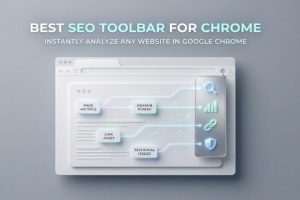 In the competitive landscape of digital marketing, efficiency and in-depth SEO insights are critical for success. An SEO toolbar, installed as a Chrome extension, provides real-time access to crucial seo data directly within your browser as you navigate the web. This capability allows seo professionals and website owners to analyze any website instantly, transforming everyday browsing into an opportunity for comprehensive website analysis, on-page seo improvements, and serp analysis.
With Google* *Chrome’s dominance as the world’s leading browser, utilizing a powerful browser extension specifically designed for seo audit, keyword research, link analysis, and site audit becomes a cornerstone of any modern SEO workflow. Whether you’re developing a new content strategy, diagnosing technical seo issues, or benchmarking against competitors, the right SEO toolbar accelerates daily seo tasks and delivers actionable seo metrics in one click.
What is an SEO toolbar and how does it work in Chrome?
An SEO toolbar is a chrome extension or browser seo tool that overlays essential seo data and metrics on top of web pages you visit. These toolbars are typically activated through a dropdown menu or a browser icon after you install toolbar from the Chrome* *Web Store or directly from the developer’s website. Once active, SEO extensions such as the ahrefs toolbar, MozBar, SEOquake, and others automatically analyze website elements, fetching key seo insights and technical seo information in real-time.
Core functionality of SEO extensions in Google Chrome
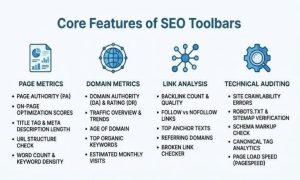
- Page-level metrics: Instantly display on-page seo factors like titles, meta description, headers (H1, H2, etc.), canonical tags, schema markup, and keyword density.
- Domain metrics: Present high-level seo ranking data such as domain authority, number of referring domains, backlink analysis, and traffic estimates.
- Link analysis: Highlight internal links, external links, follow links, nofollow links, broken links, and allows filtering links or exporting link data (export csv).
- Technical auditing: Evaluate page speed insights, http headers, indexation directives (noindex, canonical tag), redirects, and potential technical issues.
- SERP tools overlay: Some toolbars integrate seamlessly with search results, offering serp preview, ranking results, keyword ideas, and keyword counts directly within the search engine queries interface.
- Export and workflow features: Save urls, export data or seo reports to CSV, open tabs in bulk, and compare competitors efficiently.
These features are essential for both in-depth site audit and quick, on-the-fly seo checker tasks, enabling users to identify opportunities and issues without leaving Google* *Chrome.
 Key features to look for in the best SEO toolbar for Chrome
Selecting the best seo extension for chrome requires a careful evaluation of its functionality, data privacy, and usability. Here are the most important criteria to consider:
On-page SEO & technical analysis
A robust SEO toolbar should provide a detailed page audit with the ability to analyze all main seo information: titles, meta description, headers, keyword density, canonical tags, indexation directives, and highlight links (including broken links and outgoing links). It should flag technical issues that can impact SEO performance.
Internal and external link insights
Comprehensive link analysis is a must. The toolbar should let you filter links by type (internal, external, nofollow, follow), find broken links, analyze outgoing links, and even export csv for further investigation.
SERP analysis and keyword research
Advanced serp tools overlay real-time seo data and metrics on search results. This includes ranking results, domain metrics, page-level metrics, and keyword counts or suggestions. Integration with keyword research tools enhances the discovery of keyword ideas and helps refine long-tail strategies.
Performance data and speed insights
Modern SEO demands attention to technical seo, especially page speed and performance data. Look for SEO extensions that provide page speed insights using tools like Google PageSpeed Insights or similar metrics.
User experience and export features
A qualitative SEO toolbar should provide intuitive navigation through a dropdown menu, workspace management, and export features, including export data options and the ability to save urls. Features like user agent switcher and http headers inspection add depth for advanced users.
Data privacy and compliance
With increasing data privacy concerns and GDPR regulations in the European Union and beyond, ensure the seo extension details its privacy policy and adheres to responsible data practices.
Integration with other SEO tools
Leading SEO toolbars integrate with major platforms such as Google Search Console, Ahrefs.com, Moz, SEMRush, Majestic, and others to enrich the in-browser seo insights with deep, back-end seo data and reports.
Best overall SEO toolbar for Chrome: Detailed recommendation
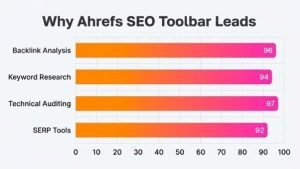
Among the wide variety of Chrome extensions available for SERP analysis, keyword research, and technical seo, the Ahrefs SEO Toolbar stands as the best overall choice for SEO professionals and advanced users. Developed by AHREFS PTE. LTD., this browser extension is available for installation directly via the Chrome* *Web Store and offers both free features and premium tools for those with an ahrefs subscription.
Why Ahrefs SEO toolbar is the top choice
Unmatched SEO data and metrics
The Ahrefs toolbar delivers comprehensive domain metrics and page-level metrics, including backlink analysis, referring domains, seo ranking, traffic estimates, and performance data right within Google* *Chrome. It overlays actionable insights atop serp results and individual web pages, making every website analysis session efficient and comprehensive.
Technical SEO and on-page SEO capabilities
Designed with advanced technical seo needs in mind, the ahrefs toolbar audits http headers, detects canonical tag issues, checks indexation directives, highlights broken links or redirects, and exposes headers, meta descriptions, and page titles for fast on-page seo review.
 Keyword research, SERP tools & workflow features
Through its rich serp tools, the toolbar empowers users to analyze search engine queries, uncover keyword ideas, evaluate keyword counts, and visualize main seo information within the context of search results. Bulk export features and CSV integration streamline reporting, while workspace functionality allows users to save urls and manage projects with ease.
Link analysis and export tools
Highlight links, filter links by type (internal, external, nofollow, follow), and export data for further investigation outside the browser. The ahrefs toolbar’s deep link checker function helps uncover gaps in link equity and monitor outgoing links—key for effective link building and site audit.
User experience, security, and compliance
The extension’s friendly UI, dropdown menu navigation, integration with user agent switcher, and clear authorize toolbar flow ensure minimal disruption during daily seo tasks. Sign in, sign out, and log in mechanics are streamlined for Ahrefs.com users, providing secure access to paid features while maintaining data privacy.
Entity integration and global SEO
The ahrefs toolbar supports multiple Google domains and languages, ensuring global seo coverage. SEO professionals working across diverse workspaces and regions benefit from seamless integration, ability to compare competitors, and a consistent seo checker experience regardless of target market. For those needing further information, Ahrefs’ robust help center (Help.Ahrefs.com) and transparent privacy policy uphold their reputation as a trusted developer.
Installing and Using Ahrefs Toolbar
- Install toolbar: Download from Chrome* *Web Store and add to Google* *Chrome with a single click.
- Sign in and authorize toolbar: Authenticate with your Ahrefs subscription (for advanced features) or utilize free features without registration.
- Analyze website instantly: Use the browser extension as you browse, evaluate serp, access seo reports, and audit any site as needed.
Alternative: Explore more SEO extensions for Chrome
While the Ahrefs SEO Toolbar is the leading multi-purpose extension, other options like MozBar (by Moz), SEOquake (by Anton Zhukov), Majestic Backlink Analyzer, Keyword Surfer, SEO Minion, and Detailed SEO Extension provide varying focuses on backlinks, on-page seo, serp checker features, and technical analysis. Many of these SEO extensions offer both free and paid features, and export capabilities like export csv, making them suitable for a range of seo tasks, from site audit to keyword research.
For users looking for additional flexibility or alternative workflows, it’s worth considering options like SEO toolbar for Chrome for specialized requirements and frequently used tools not covered by mainstream toolbars.
By leveraging the advanced features of a leading seo extension for chrome, seo professionals can streamline daily seo tasks, unlock powerful seo insights, and remain competitive in today’s search-driven digital landscape.