

How AI design tools help businesses build brands faster
Sponsored content. This article was supplied by a third party and Business Money has been paid to publish it.

Photo by Christian Velitchkov on Unsplash
AI design tools can help a business build a stronger brand in a fraction of the time it used to take. Feed one a short prompt or pick a template, and it produces a logo, a social post, or an ad that looks the part, with no studio and no month-long wait. That speed counts for a lot when a small team is expected to show up everywhere at once.
Around 88% of organizations already use AI in at least one part of their business, according to McKinsey, and design is often where it pays off fastest. Here’s how these tools work, where they save the most time, and how to keep everything on brand as you grow.
What are AI design tools?
AI design tools are apps that use artificial intelligence to create or edit visual content, such as logos, images, layouts, social graphics, and short videos, from a text prompt or a ready-made template. You describe what you want, and the tool drafts it in seconds for you to tweak.
They tend to fall into a few groups:
- Image and text-to-image generators that turn a description into artwork.
- Logo and brand-kit builders that set your colors, fonts, and marks.
- Template and layout tools for social posts, ads, and one-pagers.
- Video and motion tools for short clips.
Several are often bundled into a single app, which is why small teams can now handle work that used to require a designer. It’s the same shift explored in this guide to using AI for product design.
| In short: These tools turn prompts or templates into ready-to-edit brand visuals, so you don’t need design skills to start. |
Why brand-building speed matters now
Speed matters because your brand has to show up in more places and more often than ever. A brand that publishes little or looks inconsistent quietly fades into the background.
Adobe’s 2025 research found that content demand has roughly doubled for marketing teams, with most refreshing their content at least weekly. Small firms are keeping up: around 8.8% of US small businesses now use AI to help make their products and services, up from 6.3% six months earlier, reports the US Small Business Administration.
The right tools let a lean team maintain that pace without burning out, just as they apply AI across the business.
| In short: Brands must publish more and stay consistent, and AI lets a small team keep up on time and on budget. |
Photo by Theme Photos on Unsplash
How to build a stronger brand faster with AI
AI branding works best when you let AI do the heavy lifting and spend your time directing it. The same research found teams cutting production time by at least a fifth once they work this way. Build your brand in three moves.
1. Nail your identity first
A very solid foundation can only be laid by the basics: name, logo, direction, a set of colors, and fonts. You can generate a few versions of each element, choose a style, and then finalize the one that works for you. If you do this step correctly at the beginning, each piece you create later will look like it belongs to the same brand.
2. Generate on-brand assets at scale
Now that your identity is clear, you can quickly create day-to-day marketing pieces, from social media posts and advertisements to page headers and graphics that illustrate your products. Specify the type of content, and AI will generate several versions, and you simply choose the best one.
You can even turn a plain headline into styled, on-brand lettering with AI text effects, which is handy for thumbnails and campaign visuals. Name your colors, tone, and audience in the prompt, and the result lands closer to on-brand the first time. It pairs well with an AI website planner when you’re mapping a new site.
3. Systemize it so nothing drifts
Speed only helps if the brand still holds together. Preserve your color palette, typography, and brand mark, save them in a brand asset box that you can use over and over, so when you do anything, even on a short turnaround, it will match the style that you had before.
| In short: Set your identity, generate assets from it, then lock a brand kit so fast work stays consistent. |
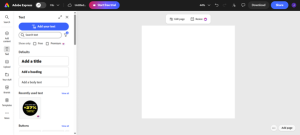
Image via Adobe
Keeping your brand consistent, and yours
Building fast raises two fair questions: will it still look consistent, and do you own what the AI makes?
For brand consistency, the solution is a brand template kit plus a habit of reviewing. Make sure your color palette, font styles, and logo stay locked in the tool. Then, reuse these elements wherever you can, and finally, inspect any piece that is going public before its release. This prevents the gradual difference between, for example, last month’s blue and this month’s blue.
On ownership, read each tool’s terms before you build anything important. Many now train their AI on licensed content made for commercial use, which matters if a logo is on your packaging or in paid ads. Confirm the license covers commercial use, keep a record of what you generate, and treat anything you’re unsure about as a draft until you’ve checked.
| In short: A shared brand kit keeps output consistent, and checking each tool’s commercial-use terms keeps it legally yours. |
Photo by Rochelle Lee on Unsplash
Where AI stops, and you take over
AI is fast at making things, but it doesn’t decide what your brand stands for. It gives you a strong first draft, while the strategy, the taste, and the choices that make a brand distinctive stay with you.
Lean on AI for the production, and put your energy into the direction. That’s the difference between a brand that’s merely quick to launch and one that’s genuinely strong. The same judgment that helps you lead your business applies to the brand behind it.
| In short: Let AI handle production and keep strategy and taste human, and a fast brand stays a strong one. |
FAQ
Q1. How do AI design tools work?
- They use generative AI to turn a prompt or template into an editable design. You describe what you want or pick a layout, the tool drafts options in seconds, and you pick the one you like, with no manual design work to begin.
Q2. How do they help a small business build a brand?
- They let you produce a logo, color palette, and matching assets quickly and cheaply, without hiring a designer. Even a one-person business can launch with a consistent, professional look in days rather than weeks.
Q3. Can non-designers use them?
- Yes. Templates and plain-language prompts do the heavy lifting, so you don’t need design training. Most are built for beginners, with editing closer to filling in a document than using professional software.
Q4. How much faster is branding with AI?
- A lot faster. Work that once took days, like drafting logo options, resizing assets, and producing variations, often takes minutes for a small team.
Q5. Do I own the brand assets AI creates?
- A. Usually yes for commercial use, but it depends on the tool, so check its terms. Tools trained on licensed content are generally intended for commercial use; confirm the license before an asset appears on packaging or in paid ads.
Q6. Are AI design tools free?
- A. Many have a free tier covering the basics, with paid plans adding advanced features, storage, or team controls. Adobe Express, for example, has a free plan, so you can test the approach before spending anything.
Q7. How do I keep AI-generated designs on brand?
- Set up a brand kit, meaning your fixed colors, fonts, and logo, and apply it to every asset. Reusing the same kit and reviewing work before it goes live stops your look from drifting.
Q8. What branding tasks can they handle?
- A. Logos, social graphics, ads, presentations, headers, styled text and background edits, plus resizing one design for every platform. They are strongest on repeatable, format-heavy work that would otherwise eat hours.
Q9. Can a startup founder build a brand alone?
- To launch, yes, you can stand up a credible brand without a design team. For one that lasts and feels distinctive, pair the speed with your own judgment on strategy and tone.
| In short: These tools are cheap or free to start, easy for non-designers, and fastest at repeatable brand work, while you keep ownership and direction. |
The takeaway
AI design tools have made a strong brand something any business can build, not just the ones with a design budget. The winning approach isn’t to hand everything to the software; it’s to let AI handle production while you steer strategy and maintain a consistent look. Start small: pick one tool, set up a simple brand kit, and create your first on-brand asset this week. You’ll move faster than you expect, and your brand will be the better for it.
| In short: Let AI do the production and you do the direction, and that is how a business builds a stronger brand, faster. |