

How to integrate an NDT scanner into your ultrasonic inspection system
Sponsored content. This article was supplied by a third party and Business Money has been paid to publish it.
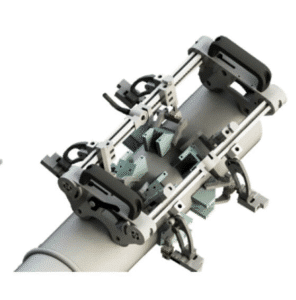 If you’re looking to improve the efficiency and accuracy of your ultrasonic inspections, integrating an NDT scanner into your system is a smart move. By automating probe movement and synchronizing data collection, scanners help eliminate manual errors and ensure consistent, repeatable results. This article walks you through what you need to know—from selecting the right scanner to connecting it with your instrument and software—for a seamless integration into your ultrasonic testing workflow.
Why scanners make a difference
When you perform inspections manually, small variations in probe angle, pressure, or speed can lead to inconsistent results. Scanners remove that variability. They let you maintain uniform coupling, stable motion, and precise positioning. You also reduce operator fatigue—especially when dealing with large or hard-to-reach surfaces. If you use advanced methods like phased array or TOFD, a scanner becomes almost essential. It allows encoded scans, automated data logging, and clearer defect mapping.
Selecting the right scanner for the job
To get the best performance, you need a scanner that suits your inspection environment and part geometry. Here are a few key considerations:
- Surface type: Flat plates, pipes, curved structures, or complex geometries all require different scanner designs.
- Inspection method: Whether it’s weld inspection, corrosion mapping, or composite delamination, each task needs the right probe setup and scanner motion.
- Movement type: Do you need 1D movement along a weld, or 2D coverage for area scanning?
- Mobility: Field inspections may benefit from lightweight manual scanners, while shop-floor testing can use motorized or crawler-type systems.
- Conditions: Consider temperature, surface coating, or moisture. Some scanners handle harsh environments better than others.
Examples:
- Use a chain scanner for circumferential welds on pipelines.
- Try magnetic wheel scanners for steel plate welds.
- Choose bracelet-style scanners for curved surfaces or aircraft fuselage.
- Go for automated crawlers when scanning tank shells or ship hulls.
Confirming compatibility with your equipment
Before connecting your scanner, verify that it works with your ultrasonic testing (UT) instrument. Three key things to check:
- Encoder format: The scanner’s encoder must output a signal your instrument understands—such as TTL or quadrature.
- Connection type: Make sure connectors physically match, and that cable lengths suit your setup.
- Software integration: Your UT instrument or software should be able to convert encoder signals into scan positions for B- or C-scans.
Tip: If you’re using multiple scan axes or combining phased array with TOFD, ensure your system supports dual encoder inputs.
Setting up mechanical and electrical connections
A smooth setup process makes scanning faster and more reliable.
Mechanically:
- Secure the scanner to the test surface—use magnets, clamps, or suction cups as needed.
- Align wheels or tracks with your desired scan path.
- Attach wedges or delay lines if your probe setup requires them.
Electrically:
- Connect the encoder cable to your UT instrument.
- For motorized scanners, plug in the motor controller and test its response.
- Verify that encoder direction and speed are reading correctly on-screen.
This ensures that every movement is recorded accurately for later review or defect sizing.
Calibrating the system for accuracy
Calibration ensures that scan data matches physical positions on the part.
- Zero the encoder: Set a defined starting point before each scan.
- Check scale factor: Make sure the encoder’s movement translates into correct linear distance.
- Validate tracking: Use known standards or calibration blocks to test how flaws appear in the scan image.
Skipping calibration can lead to data misalignment and false readings—avoid it at all costs.
Setting up the software for scanning
Once everything is connected, configure your UT software to start capturing meaningful data.
- Define scan range, step size, gain settings, and probe delay.
- Enable encoder tracking to link probe position with each data point.
- Assign multiple channels if you’re using more than one probe type.
- Run a dry scan first to confirm system synchronization and fix any lags or signal errors.
Some advanced systems, such as an ultrasonic scanner from NDT-KITS, offer intuitive setup tools to help you streamline the scanning process.
Running the scan and monitoring performance
Now it’s time to start the actual inspection. Move the scanner at a steady, consistent speed to maintain image clarity and uniform coupling.
Keep an eye on:
- Couplant quality—ensure proper wetting of the probe surface.
- Probe contact—adjust pressure if needed.
- Live signal display—watch for unexpected noise, signal loss, or skips.
Pro tip: Stay alert. Even with automation, manual intervention may be needed to adjust position or fix weak signals.
Reviewing and saving the data
After scanning, review your B-scan or C-scan results:
- Identify defect locations, shapes, and depths.
- Use measurement tools in the software to size flaws.
- Export results in formats like CSV or DICONDE for traceability.
- Save both the scan data and encoder logs for future audits or reports.
This data is valuable not just for defect detection but also for maintenance planning and quality certification.
Common mistakes to watch out for
Even experienced users run into issues if they rush the setup. Avoid these pitfalls:
- Skipping encoder calibration
- Poor surface prep, leading to probe lift-off
- Loose fixtures causing motion drift
- Incompatible scanner–instrument pairing
- Not testing the system with a dry run
Investing a few extra minutes in preparation saves hours of troubleshooting later.
Final thoughts
Adding an NDT scanner to your ultrasonic inspection system can dramatically enhance your inspection capabilities. With precise probe movement, better data consistency, and full scan coverage, you’ll achieve more reliable inspections across a range of applications. From pipelines and pressure vessels to aircraft panels, proper scanner integration ensures your system performs to its full potential—every time.
Whether you’re just getting started or looking to upgrade your current setup, taking a methodical approach will help you succeed. And when in doubt, partner with trusted NDT suppliers to get the hardware and guidance you need.