

HVAC invoicing software that syncs with QuickBooks
Sponsored content. This article was supplied by a third party and Business Money has been paid to publish it.
 10 best HVAC invoicing software that syncs with QuickBooks
Think about the last time a job closed perfectly. Technician done, customer happy, parts used, hours logged.
Then someone had to go back to the office and type it all into QuickBooks manually.
That gap between field and finance is where HVAC businesses quietly lose money. Delayed invoices, duplicate entries, missed line items. It adds up faster than a refrigerant leak.
The fix? HVAC invoicing software that actually talks to QuickBooks. Not a workaround. Not an export button. A real, live sync that moves job data from the field into your books the moment the work is done.
We put together this list to help you find the right fit, whether you’re a solo operator or managing a small crew.
Why QuickBooks sync actually matters
QuickBooks is the financial backbone of most HVAC operations. Payroll, tax reports, expense tracking all lives there.
The problem? QuickBooks wasn’t built to manage what happens in the field. Jobs, schedules, technician notes, part numbers none of that originates in QuickBooks. When your field software and your accounting software don’t talk to each other, someone has to play translator. That’s usually your office manager, burning hours re-entering the same information twice.
A real QuickBooks integration changes that. The moment a technician marks a job complete, the invoice generates automatically and syncs directly into QuickBooks. No lag, no manual entry, no “I’ll catch up on Friday.”
Running a tight operation means knowing where every dollar went. If you’re still doing it manually, this breakdown of how field service reporting tools drive profitability is worth a read.
The 10 best HVAC invoicing software options with QuickBooks sync
Let’s get into it.
 1. Field Promax
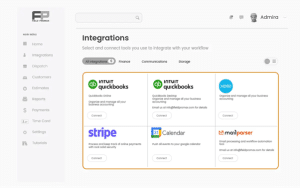
Field Promax is built for small-to-mid-sized HVAC teams that want a complete job management system, not just a billing app. The QuickBooks integration is two-way and real-time. Invoices generated in the field sync instantly to QuickBooks, and any changes in QuickBooks flow back into the system automatically.
What makes it stand out is how the whole workflow connects. Technicians close jobs from the mobile app, invoices generate automatically with all line items, and everything lands in QuickBooks without a single manual step. Tools like Field Promax are built around the idea that your office shouldn’t have to chase the field to get the books straight.
Best for: HVAC businesses with 1-50 employees who want scheduling, dispatching, work orders, invoicing, and QuickBooks sync all in one system.
- Real-time QuickBooks sync
- Mobile work order & invoice automation
- Scheduling, dispatch & customer history
- Predictable pricing as your team grows
2. Service Fusion
Service Fusion covers the basics for small HVAC teams: scheduling, dispatch, and invoicing with a QuickBooks Online sync. Its flat-rate pricing is one of the more honest setups in this category, with no per-user fees on higher tiers.
Where it runs thin: the mobile app experience gets mixed reviews from technicians, and the reporting side is limited compared to platforms built specifically around field service operations. It works for teams that mostly need invoicing and a basic schedule view, but it doesn’t grow well once you need deeper job costing or route optimization.
Best for: Small HVAC shops that need flat-rate pricing and basic QuickBooks sync without advanced features.
3. Fieldy
Fieldy is a newer entrant targeting small field service teams. The QuickBooks integration focuses on invoice sync and payment tracking. One case study cited a reduction in payment cycles from 21 days to 9 after connecting Fieldy to QuickBooks Online.
That’s a real win for cash flow. The platform is still building out its feature depth, though. Teams with more than a handful of technicians will likely hit ceilings around dispatch visibility, recurring job management, and customer history tracking. It’s a viable starting point for very small operations.
Best for: Solo HVAC operators or 1-3 person teams taking their first step away from spreadsheets. Teams managing recurring maintenance routes will want to understand how job tracking for repeat service calls works across platforms before committing.
4. Repair-CRM
Repair-CRM takes an asset-based approach to invoicing and QuickBooks sync. Every work order and invoice is tied to a specific piece of equipment, which is useful for HVAC contractors who manage warranties and want to see the full repair history of a unit before each visit.
The focus is narrow by design. It’s not a full field service management platform, and it doesn’t try to be. If your main need is linking invoices to equipment history in QuickBooks, Repair-CRM does that cleanly. If you also need scheduling, a dispatch board, team management, and reporting, you’ll need to stitch together additional tools.
Best for: Small HVAC shops where equipment history and asset tracking are the top billing priorities.
5. Zuper
Zuper is a field service management platform with QuickBooks integration and solid location intelligence features. Route optimization and real-time technician tracking make it useful for teams spread across a wider service area.
The pricing scales by user and gets expensive fast. Plans with QuickBooks integration start at the Essentials tier, which runs significantly higher per month than many alternatives in this category. For a 5-person HVAC team, the monthly cost can be hard to justify against platforms that include the same core features at a lower price point.
Best for: HVAC teams with a wide service territory who prioritize route optimization over affordability.
6. Tradify
Tradify is a simple, no-frills platform for small trade businesses. It covers quoting, scheduling, invoicing, and a QuickBooks sync all with a clean interface that technicians can learn quickly.
The simplicity is also the limitation. Tradify works well for teams that run mostly straightforward residential jobs. Once you add recurring maintenance agreements, multi-crew dispatching, or the need for deeper reporting, the platform starts to show its limits. The pricing is per-user, which adds up as your team grows.
Best for: Solo HVAC operators or very small teams who want a quick setup and basic invoicing.
7. Workever
Workever focuses on small-to-medium trade businesses with a straightforward scheduling and invoicing setup. The QuickBooks integration handles invoice push and basic financial syncing.
It’s a reasonable option for HVAC teams in the early stages of moving off paper. The platform covers the fundamentals but lacks the depth needed as a business scales. The field service app landscape has shifted significantly, and platforms like Workever represent the simpler end of that spectrum.
Best for: Small HVAC businesses that need a basic digital solution for quotes, jobs, and invoices.
8. Arrivy
Arrivy positions itself around automated invoicing and QuickBooks sync, with a strong emphasis on customer-facing communication arrival windows, digital signatures, and job completion photos. The QuickBooks integration pulls invoices from completed jobs automatically.
The gap is on the broader operations side. Arrivy handles the job-to-invoice flow well, but it’s not a complete field service management platform. Scheduling depth, recurring job management, and technician-level reporting are areas where teams typically find they need to supplement with other tools.
Best for: HVAC contractors focused on customer experience features alongside QuickBooks invoicing.
9. Sera
Sera is a cloud-based platform targeting residential HVAC and plumbing contractors. It covers job management, route planning, dispatch, and QuickBooks sync for invoicing and accounting. The pricing optimizer feature is a differentiator, helping contractors set and adjust flat-rate pricing based on job data.
It’s a focused tool for residential work. Commercial HVAC contractors managing multi-site accounts, service contracts, or larger crews will find Sera’s scope too narrow. The platform is still growing its integrations and reporting capabilities.
Best for: Residential HVAC contractors who want pricing optimization alongside basic QuickBooks invoicing sync.
10. ServiceBox
ServiceBox is a Canadian-developed platform built for service companies, with strong QuickBooks and Sage 50 integration which makes it a relevant option for HVAC businesses operating in Canada. It covers work orders, scheduling, recurring jobs, timesheets, and invoicing.
The interface is functional but dated compared to newer platforms. Technicians used to modern mobile experiences often find the app requires more steps than expected. For Canadian HVAC contractors who need both QuickBooks and Sage 50 support, it fills a specific gap. HVAC businesses in Canada and the US face similar operational challenges, and the right software should handle both invoicing and job tracking in one place.
Best for: Canadian HVAC contractors who need Sage 50 compatibility alongside QuickBooks.
What to look for when comparing these tools
Most platforms on this list cover the invoicing basics. Here’s where the real differences show up.
1. One-way vs two-way sync
Many tools only push data one direction from the field app into QuickBooks. A true two-way sync means changes in either system update both. That’s what keeps your books and your operations aligned without manual reconciliation.
2. Invoicing depth vs. just invoicing
Some tools on this list are primarily invoicing apps with a QuickBooks connector. Others are full field service management platforms that include invoicing as one part of a larger workflow. If your team also needs scheduling, dispatch, job history, GPS tracking, and reporting, a standalone invoicing tool will leave gaps.
3. Scalability
Per-user pricing that seems affordable at 3 people can become a burden at 10. Flat-rate plans with features bundled in tend to scale more predictably. Check what’s included at each tier before you commit.
4. Mobile experience
Your technicians are the ones triggering invoices on-site. If the mobile app is clunky or slow, adoption breaks down and the QuickBooks sync only works if data is entered consistently in the field.
The bottom line
 Every tool on this list syncs with QuickBooks in some form. The real question is what wraps around that sync.
A standalone invoicing tool gets one job done. A complete field service platform gets your whole operation connected: scheduling, dispatch, work orders, customer history, invoicing, and reporting all feeding QuickBooks automatically.
The gap between field and finance doesn’t have to be someone’s full-time job. Pick the right setup, and it closes itself.
Frequently asked questions
Does HVAC invoicing software work with QuickBooks Desktop?
Most modern platforms integrate with QuickBooks Online. Fewer support QuickBooks Desktop. Field Promax and ServiceBox are among the options that cover both. Always confirm Desktop compatibility before committing, especially if your accounting team hasn’t migrated to the cloud version yet.
What’s the difference between one-way and two-way QuickBooks sync?
One-way sync pushes data from your field software into QuickBooks only. Two-way sync means changes in either system update both automatically. Two-way is significantly more reliable for teams where both the office and the field make updates throughout the day.
Can technicians send invoices directly from the job site?
Yes, in most of the tools on this list. When a technician marks a job complete on their mobile app, the software generates an invoice automatically and syncs it to QuickBooks in real time. Some platforms also support on-site card payments, so you can collect payment the moment the job wraps.
How do I know if I need a full FSM platform or just invoicing software?
If you’re only looking for faster billing, a standalone invoicing tool may be enough. But if you also struggle with scheduling, dispatching, tracking job history, or managing technician workloads, a full field service management platform will solve more problems with one subscription instead of paying for multiple tools that don’t talk to each other.