

Preparing your tech setup for a flawless one-way video interview
Sponsored content. This article was supplied by a third party and Business Money has been paid to publish it.
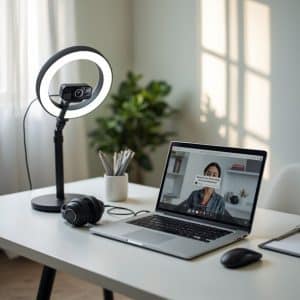 With the job market evolving, one-way video interviews have become a game-changer for both recruiters and candidates. Platforms like Hireflix One-Way Video Interview Software help companies streamline their hiring processes while giving candidates the flexibility to record interviews at their convenience. However, while these interviews are convenient, they also demand a carefully prepared technical setup to avoid interruptions or distractions. This article provides practical, step-by-step guidance to ensure your tech setup supports a seamless and professional one-way video interview experience.
Why preparation matters for one-way video interviews
Unlike live interviews, one-way video interviews have the added pressure of recording your responses for later review. This means technical hiccups—a microphone glitch, camera misalignment, or poor lighting—could harm the impression you leave. Recruiters using platforms like Hireflix One-Way Video Interview Software expect sharp video quality and clear audio, as these factors demonstrate your attention to detail and professionalism. That’s why preparing your tech setup well in advance is critical.
By proactively addressing potential technical issues, you’ll boost your confidence and ensure your responses shine without being overshadowed by avoidable distractions.
Optimizing your webcam placement and settings
Your webcam is the visual gateway to your interview, so getting it right should be your first priority. Begin by checking its resolution. Most modern webcams offer at least 720p HD quality, but whenever possible, aim for 1080p for sharper visuals. A clear and professional image immediately sets a positive tone.
Position your webcam at eye level to simulate in-person eye contact. Recruiters reviewing responses on Hireflix One-Way Video Interview Software value this simple adjustment, as it creates a natural and engaging visual. If you’re using a laptop, consider using a stack of books or a dedicated laptop stand to raise the camera height. Additional camera settings, such as adjusting brightness and color balance, can also help present you in the best light.
Crafting professional lighting without breaking the bank
Lighting is another make-or-break factor. Poor lighting can cast shadows or create glares, distracting viewers from your answers. While studio lighting setups are ideal, you can achieve a professional look with household items.
Position yourself facing a natural light source like a window, which provides soft, flattering illumination. If natural light isn’t available or consistent, desk lamps with neutral white bulbs can work wonders. Avoid placing light sources directly behind you to prevent backlighting, which makes your face appear dark.
Take time before recording to test how these setups look on screen. Subtle adjustments in light placement can dramatically improve video quality.
Achieving crystal-clear audio for maximum impact
Audio quality is just as important, if not more so, than video quality. Even the most eloquent responses can lose their impact if muffled or filled with background noise. When interviewing through tools like Hireflix One-Way Video Interview Software, many candidates overlook the importance of a good microphone setup.
Invest in a standalone USB microphone or a high-quality headset. Both options provide a significant improvement over built-in laptop microphones. Additionally, conduct your interview in a quiet space where you’re unlikely to be interrupted by external sounds. Carpets, rugs, and curtains can also minimize echo in your recording environment.
To ensure optimal audio clarity, record a test video beforehand. Listen closely for any buzzing, echoes, or other harsh noises, and adjust your microphone settings as needed.
Internet connection essentials for a smooth experience
Nothing deflates confidence quicker than a sudden internet failure mid-interview. Platforms like Hireflix One-Way Video Interview Software typically function well with a standard broadband connection, but your bandwidth should still support high-definition uploads without lag.
Conduct a speed test ahead of time to ensure your connection meets the minimum requirements for video recording. Upload speeds of at least 5 Mbps are often recommended. If your connection is unstable, consider using an Ethernet cable for a direct, more reliable connection to your router.
It’s also a good habit to minimize bandwidth usage during your interview—close unnecessary background applications, disconnect other devices using the network, and ensure your system has no scheduled updates or downloads queued up.
Preparing your device for optimal performance
A sluggish device can harm both your focus and your video performance. To avoid frustrating technical interruptions, dedicate time to optimizing your computer or laptop before hitting record.
Start by closing all irrelevant applications to free up system memory and processing power. Check storage levels too—running out of space can lead to delays when saving or uploading the video file. Tools like Hireflix One-Way Video Interview Software might have system requirements, so double-check that your device meets their specifications well in advance.
Regular maintenance, like restarting your device and ensuring all drivers are up to date, can also prevent last-minute issues.
Dressing the part and avoiding visual distractions
While your technical setup plays a foundational role, your appearance and surroundings also contribute to the overall impression. Treat one-way video interviews as you would an in-person meeting by dressing professionally. Neutral, solid colors work best on camera, while flashy patterns or stark whites can be distracting under bright lights.
Equally important are your surroundings. Sit in front of a tidy, uncluttered background—ideally a plain wall or a neat, home-office space. Tools like Hireflix One-Way Video Interview Software don’t apply virtual backgrounds, so anything in the frame becomes part of your first impression. Spend time removing potential distractions to keep the interview visually focused on you.
Conducting test runs to build confidence
Even with every precaution, you should never wait until recording day to test your setup. Schedule at least one full practice run where you simulate the interview environment. Treat this as a dry run—test your lighting, camera placement, and audio quality while using a platform as close as possible to Hireflix One-Way Video Interview Software.
Watching your practice recordings can help you spot issues you might not notice otherwise, from poor posture to background noise. But more importantly, running through practice sessions helps reduce nerves, ensuring you feel prepared and poised when it’s time to record the real thing.
Making the most of Hireflix One-Way Video Interview Software
One-way video interviews on platforms like Hireflix One-Way Video Interview Software are designed to be straightforward and user-friendly. Yet, understanding how the software works can help you use it to your advantage. Explore its features, such as time limits for responses, retake options, and submission processes.
Familiarizing yourself with the platform ensures a smoother experience and fewer surprises on recording day. It also demonstrates that you’ve taken the time to respect the recruiter’s process, further reinforcing the professionalism you convey.
Preparedness leads to confidence
A successful one-way video interview doesn’t simply happen—it’s the result of thoughtful preparation. By carefully testing and optimizing your tech setup, you can present yourself as confident, capable, and professional. Platforms like Hireflix One-Way Video Interview Software excel in creating opportunities for candidates, but how well you adapt to this interview format is up to you.
Remember, first impressions can’t be redone, so the effort you put into setting the stage now will pay dividends in clarity, professionalism, and impact. Ensure your technology supports your message, and you’ll leave recruiters with a memorable and positive impression.